NEXTERA ENERGY · ENTERPRISE UX · LEAD / SR UX DESIGNER · 12 MONTHS

Modernizing an Enterprise Situational Intelligence Platform

Transforming complex data grids and disconnected features into streamlined digital workflows.
Overview : What is Light+?

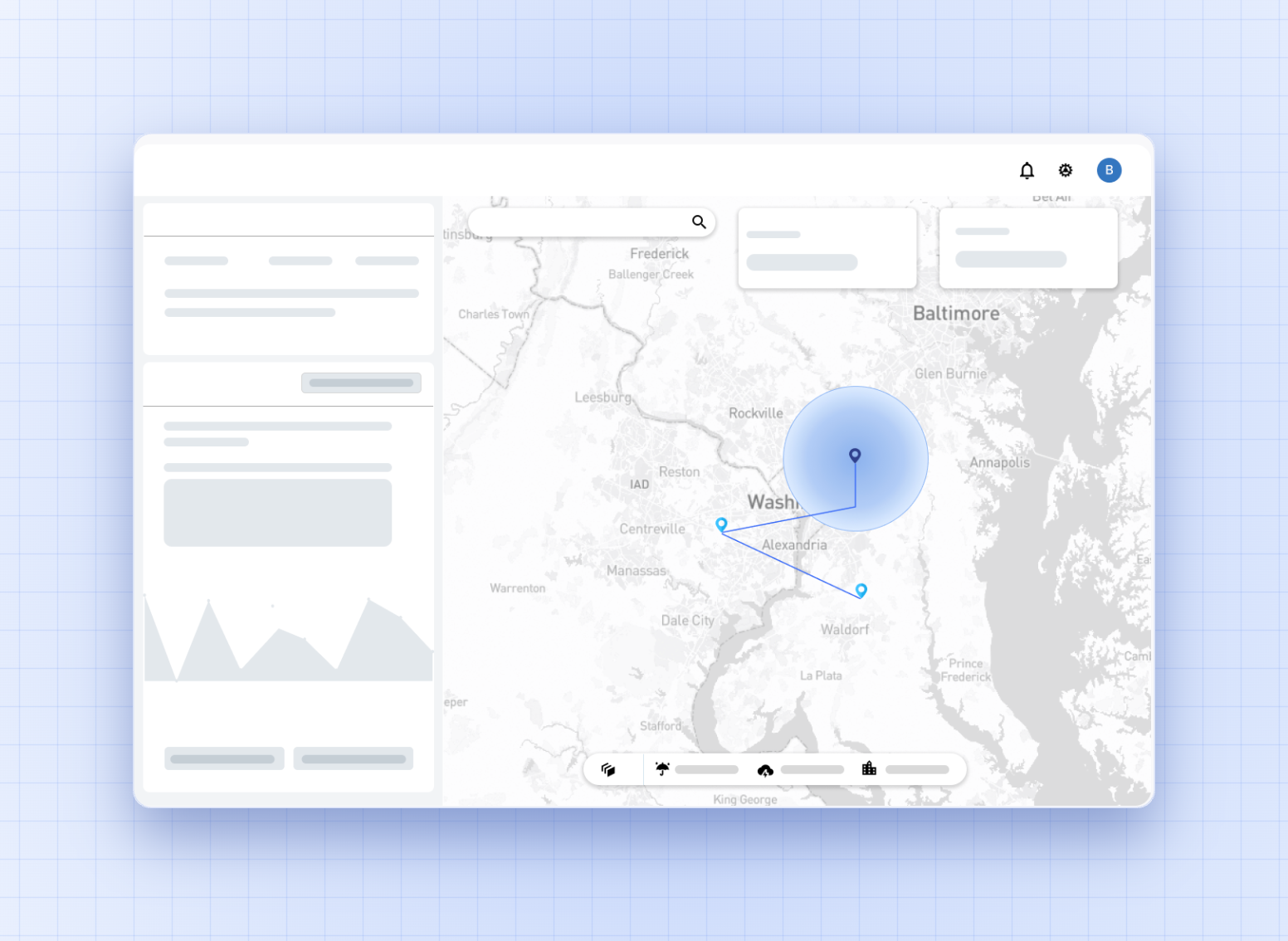
Light+ is an enterprise-scale situational intelligence platform used by several groups of technical users responsible for analysing and improving the reliable transmission of power to residential and commercial buildings across 500+ substations in Florida.
‍
The app maps a virtual digital twin of the physical power grid, with access to information about more than a million smart devices such as meters, switches and transformers, on a GIS-based interactive map.
‍
It is business critical: its impact runs directly to the cost and efficiency of field crews on the ground.
‍

Project Type & Involvement
Work for NextEra Energy Inc. Enterprise Product Design
Timeline
12 months
Platform
Enterprise web application

My role

I was the first designer the team had ever had. No Figma file, no design system, no research practice, no process to inherit. Alongside a product owner, business owner, tech lead, agile lead, IT manager and ten developers across onshore and offshore teams, I owned the entire project as a design team of one.

  • I owned and led the entire modernization effort across discovery, strategy, ideation and prototyping, working closely with engineering and business stakeholders through handoff and post-build validation.
  • I introduced a sustainable user-centred design process inside the existing agile framework, so the team designed before building rather than spending on rework afterwards.
  • I used an AI-native design process to speed up implementation once the company began adopting AI.
  • I worked through technical, business and API constraints so the final solution was not only intuitive and useful, but buildable within our infrastructure.

Impact of the modernization

400+
unique visitors in the first quarter after launch, against no increase at all before it
50%
fewer ServiceNow tickets about usage and feature access
30+
features redesigned, every one validated with users before it was built

Engineering velocity

Clear prototypes and a shared direction meant developers spent less time guessing and reworking, and more time building the right thing once.

Stakeholder trust

Design went from absent to having a standing seat in product decisions, and user-centred practice became how the team worked rather than something new being trialled.

Not measured: time to complete a fault investigation, and training time for new operators. Both would have been the better measures, and neither was instrumented.

From a tool people worked around to one they worked in

Thirty features were redesigned across the platform. Three of them, in more detail here.

01

Navigation and learnability

Users start from the whole network and pan to what they need. Filters narrow the view only when the task calls for it.

02

Fault investigation

Investigating a fault went from piecing together three views to reading one, with SCADA, tickets and the map in a single pane.

03

One platform, several operators

Search now builds on the investigation instead of replacing it, so operators compare several points on one map.
DETAILED PROCESS ↓

Context

Initial Ask

The project started with the business wanting to move the application to a new version of Angular, and tasked me with a like-for-like redesign of the existing legacy application with only minimal UI updates.

I pushed back on that and recommended we run discovery first and strategize a value-added modernization based on the findings. I built a discovery plan with the stakeholders, working around real constraints: limited user availability, one shot at discovery, and very little existing documentation.

Discover

Discovery

Understanding the existing state of the application

The business challenge

Upon talking to business stakeholders, the following challenges were identified causing frustration among product owners

User adoption

Platform growth gradually declined to zero increase in new or unique monthly visitors, as teams reverted to offline methods.

Outdated functionality

Cluttered legacy grids required extensive scrolling and disjointed screen jumps, making it tedious to retrieve basic information.

Disconnected features

Unlinked components forced operators to jump between separate modules, adding friction and dropping engagement.

Eroding trust

The gap between what the product did and how the work actually ran caused confusion, and confusion cost the system its credibility.

What I proposed instead

The modernization approach, phased by capability rather than by screen.

Research

To understand the users' pain points and future needs, I used four research methods, chosen around user availability and business constraints.

6 workshops

Online, with a mixed set of user roles in each session, walking through how the platform was actually being used, the tasks they accomplished with it, and what they liked and disliked.

2 contextual inquiries

Two field visits, to understand the context and real-world behaviour of users, and how this application fits into their day to day.

4 SME interviews

Interviewing stakeholders and business experts about the vision for the application, the future goals and the needs behind them.

30+ support tickets

Analysed ServiceNow tickets to uncover patterns in user complaints and recurring issues with the application.

Some quotes from the workshops and field visits

"I want to be able to be like a Superman and select everywhere on the map without being restricted to filtering. I am frustrated because Google Earth had this in 2015! I really like how it lets me see the entire area and not always need to drill down to MA / Substation / Feeder."

Delivery assurance lead

"Once we get to the feeder view where we see RC Off, we want to look at our region as a whole and not just a particular area. I want to be able to click and select an entire region like South Dade or North Dade. As a DAL, I want to be able to see the entire state."

Delivery assurance lead

"If I have someone who is not trained check info for me, they can't understand they first need to filter down. They just start zooming in and out, and since most checkboxes stay disabled, they think the app isn't working."

Production lead

“I don't like the fault investigation results. We can only see one fault and there is a lot of vertical scrolling. I usually look at one feeder during investigations, but I also want to easily compare it against nearby devices, SCADA message groupings, and trouble tickets.”

Regional reliability lead

"I want to open fault investigations and AFS at the same time but it's too difficult. Pop-up windows open on new tabs, but I want to see SCADA, AFS, and investigations all next to the map at once."

Production lead

"I usually compare 3 to 4 faults based on multiple trouble ticket findings. It's really frustrating to keep going up and down in that small window. I want details to open in a separate window that I can drag onto my other monitor."

Delivery assurance lead

"DATA AUDIT: Multiple ServiceNow tickets show users unable to access features because they didn't realize choosing a map layer was a mandatory prerequisite for that feature to work."

SERVICE NOW CUSTOMER TICKET

"DATA AUDIT: 11 ServiceNow support tickets explicitly analyzed where operators mentioned being completely unable to find critical Trouble Ticket information or figure out how to send active faults to the RC Off dashboard."

SERVICE NOW CUSTOMER TICKET

Major findings

Finding 01

Navigation was rigid and did not cater to multiple user personas with different needs

Everyone entered the platform the same way: drill down from management area, to substation, to feeder. That path suits someone investigating a single feeder. It does not suit a Delivery Assurance Lead who needs to read a whole region, or anyone arriving with a location rather than a hierarchy in mind. One route served several jobs, and served most of them badly.

Finding 02

Global filtering constrained everything downstream, limiting access to localised information

Nothing loaded until a filter was set, and that filter then constrained everything after it. Users could see one substation at a time, so comparing anything across area or region boundaries meant resetting and reloading the view. The filter was being used to unlock the application rather than to narrow it, which is a different thing and a far more expensive one.

Finding 03

Fault analysis, one of the core capabilities, was exceptionally slow and fragmented

Fault investigation was the capability people relied on most and the one that cost them the most time. Results opened one fault at a time in a small window with heavy vertical scrolling, while the SCADA messages, trouble tickets and nearby devices needed to interpret them sat elsewhere. Operators routinely compare three or four faults. The interface assumed they would only ever look at one.

Finding 04

Features were interlinked in ways that created several routes to a single action

The same task could be started from several places, each behaving slightly differently, and nothing indicated which route was the intended one. Pop-ups opened in new tabs rather than alongside the map. People learned one path that worked and stopped exploring, which is how capability that already existed went unused.

Finding 05

System status and visibility were absent, causing confusion and abandonment

A user abandoned the application because a checkbox was greyed out and nothing told them a filter had to be selected first. That is a learnability failure, not a user failure. The support tickets showed the same thing at scale: people unable to use a feature because nobody had told them selecting a map layer was a prerequisite for it to work.

Define

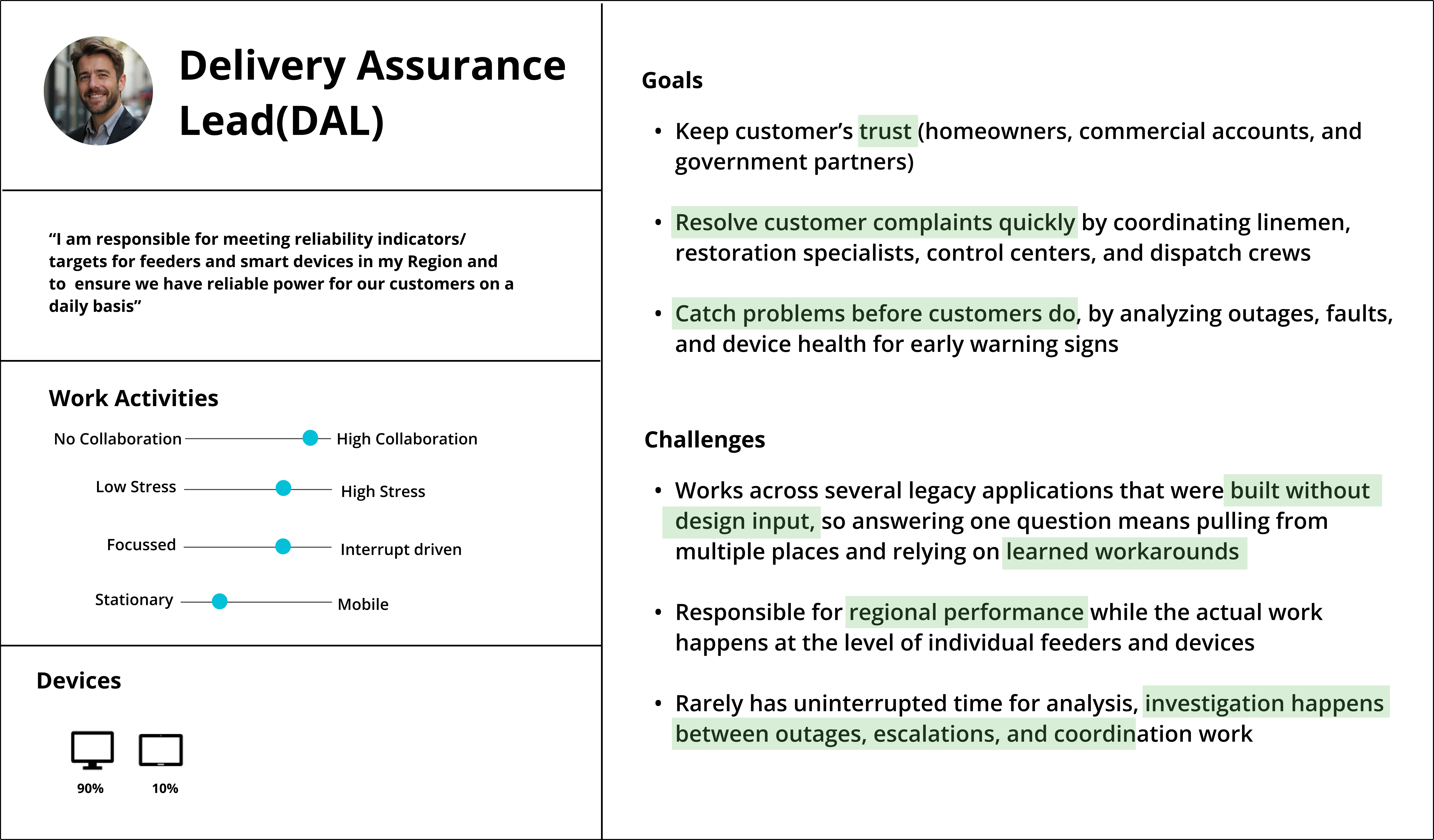
Identifying the role based personas

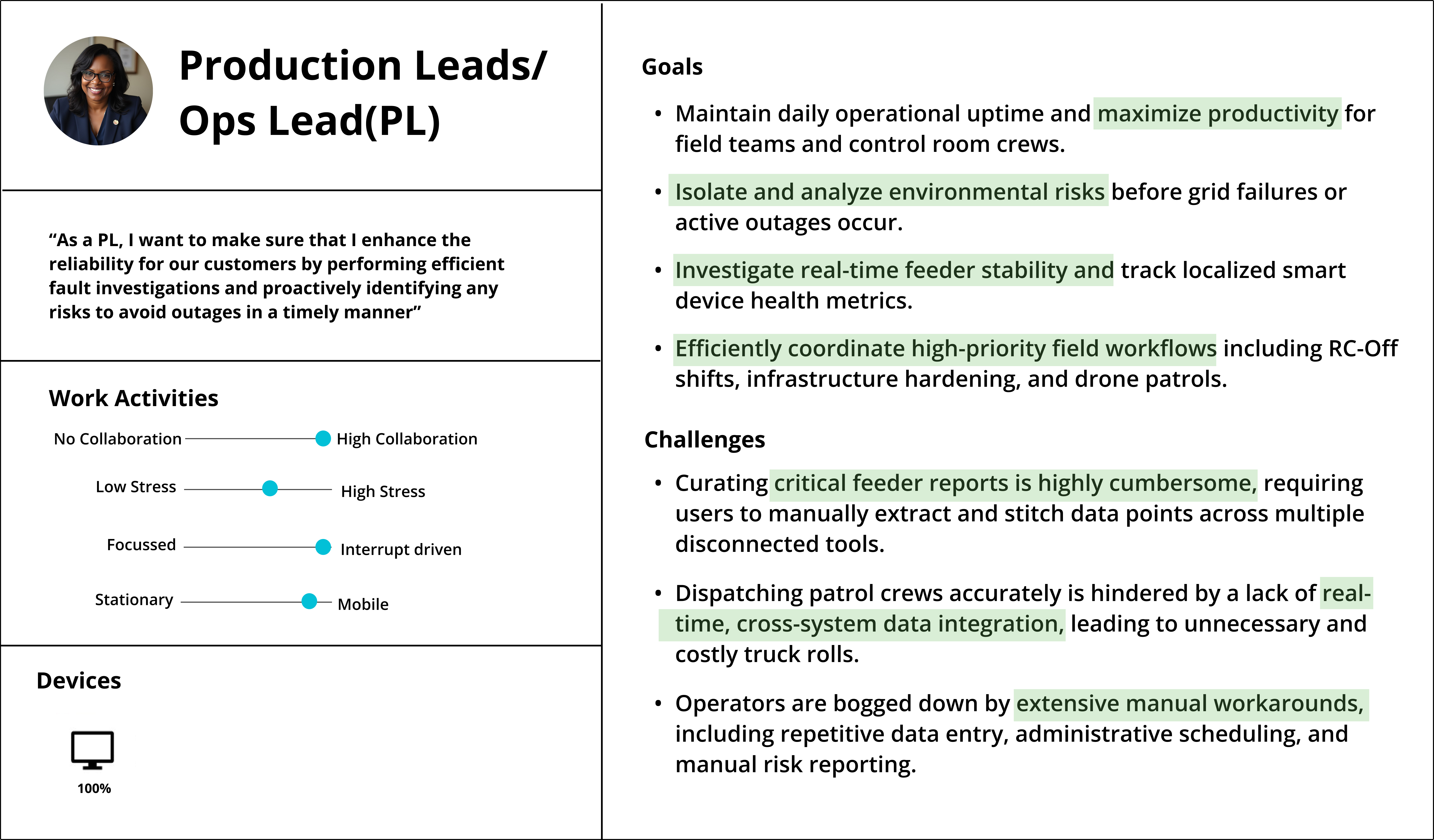
The platform had been built for an average operator who does not exist. In practice four distinct roles arrive at it with different questions: reliability managers accountable for regional performance, control centre leads coordinating live events, customer assurance leads answering complaints, and restoration specialists working out where to send a crew. They depend on the same underlying analysis, but they need different things from it, and none of them was being served well. I built and validated a persona library so those differences had somewhere to live, and so feature decisions could be argued against a role rather than a preference.

Delivery Assurance Lead, the primary user.

Production and Operations Lead.

Strategy

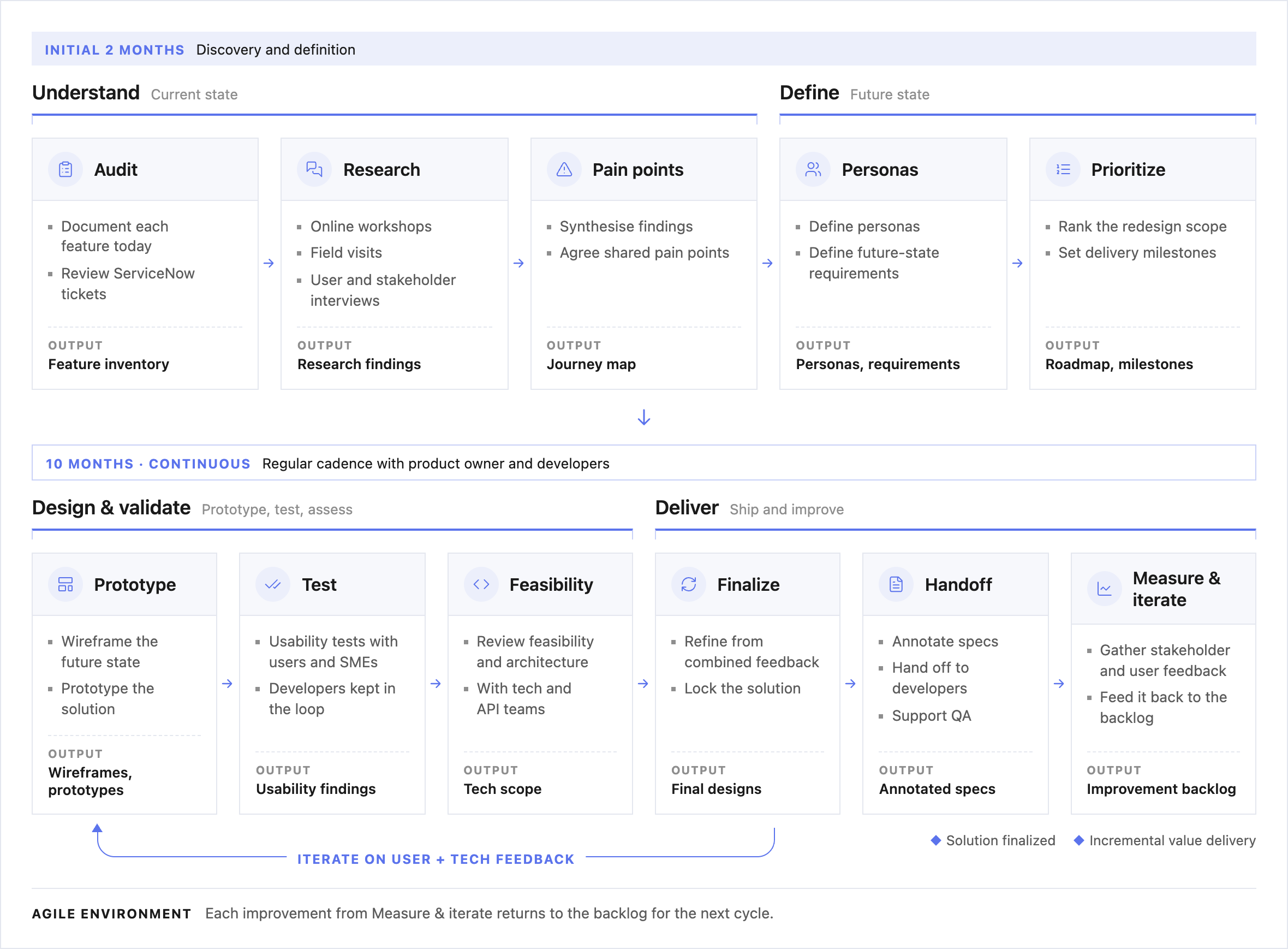
Formulating a clear plan for the re-design and validation and handoff

Thirty features across a twelve-month build, with a team of ten and an API that was being rebuilt underneath us. The order mattered as much as the design. I planned it around three things: what the platform needed to be able to do, when engineering could actually deliver each part, and who had to agree before anything moved.

Capability

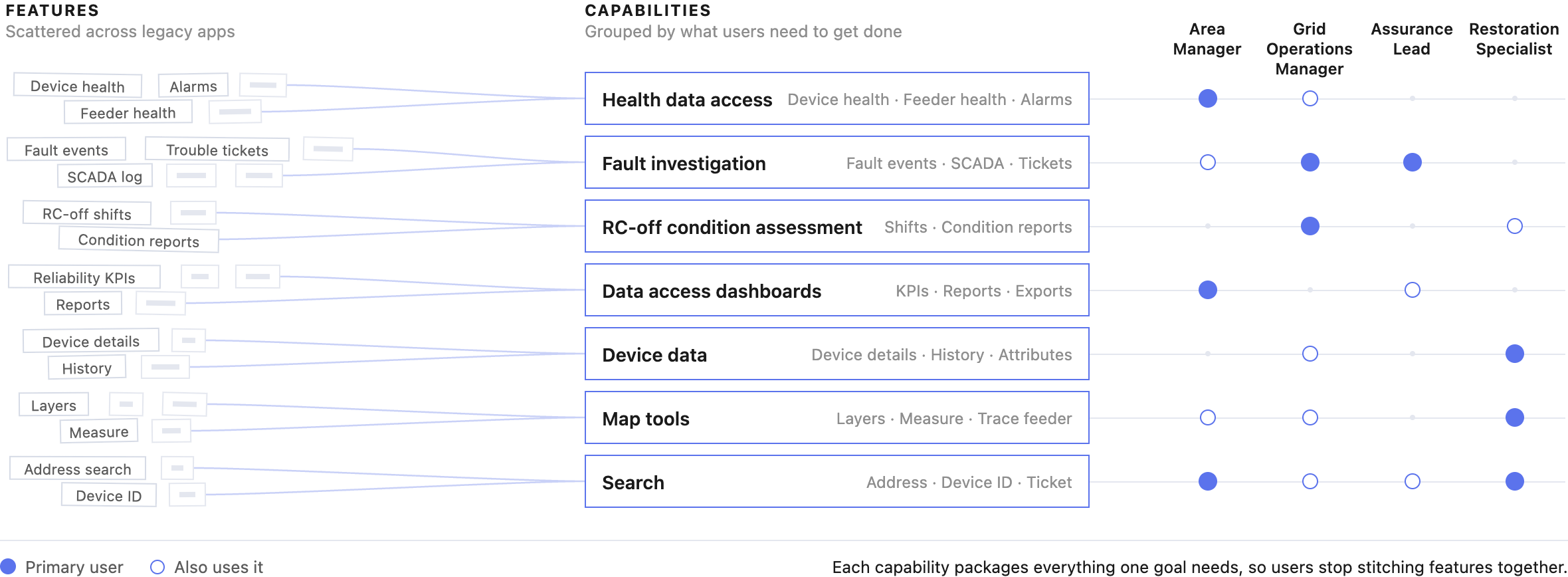
I mapped what the platform needed to be able to do, rather than which screens needed redrawing. That produced a capability matrix the business could argue with, and it is what every later decision was measured against: a feature was redesigned, added or removed depending on whether it served a capability, duplicated one, or served none. Slicing by capability also meant each release could stand on its own instead of waiting for the whole migration.

The capability matrix the roadmap was built from.

Milestones

The sequence was set by the API team's readiness, not by what was easiest to design. Each milestone depended on specific data being available, so I worked backwards from what engineering could actually serve and when. That kept design from racing ahead into work that could not be built, and kept engineering from waiting on decisions that had not been made.

Milestones sequenced against API readiness.

Collaboration

Nothing moved to engineering until users and stakeholders had both seen it. I ran a regular cadence with the product owner to gather requirements and feed back on each redesigned feature, demoed designs to developers to pressure-test feasibility early, and worked with data engineers on what the sources could support. The point was to answer “is this buildable?” while the design was still cheap to change.

The cadence between design, product and engineering.

Prototype & design

Examples of re-designed features

Each feature was redesigned, added or removed against the agreed capability matrix, to cut redundancy between features and consolidate fragmented capabilities into one place.

01

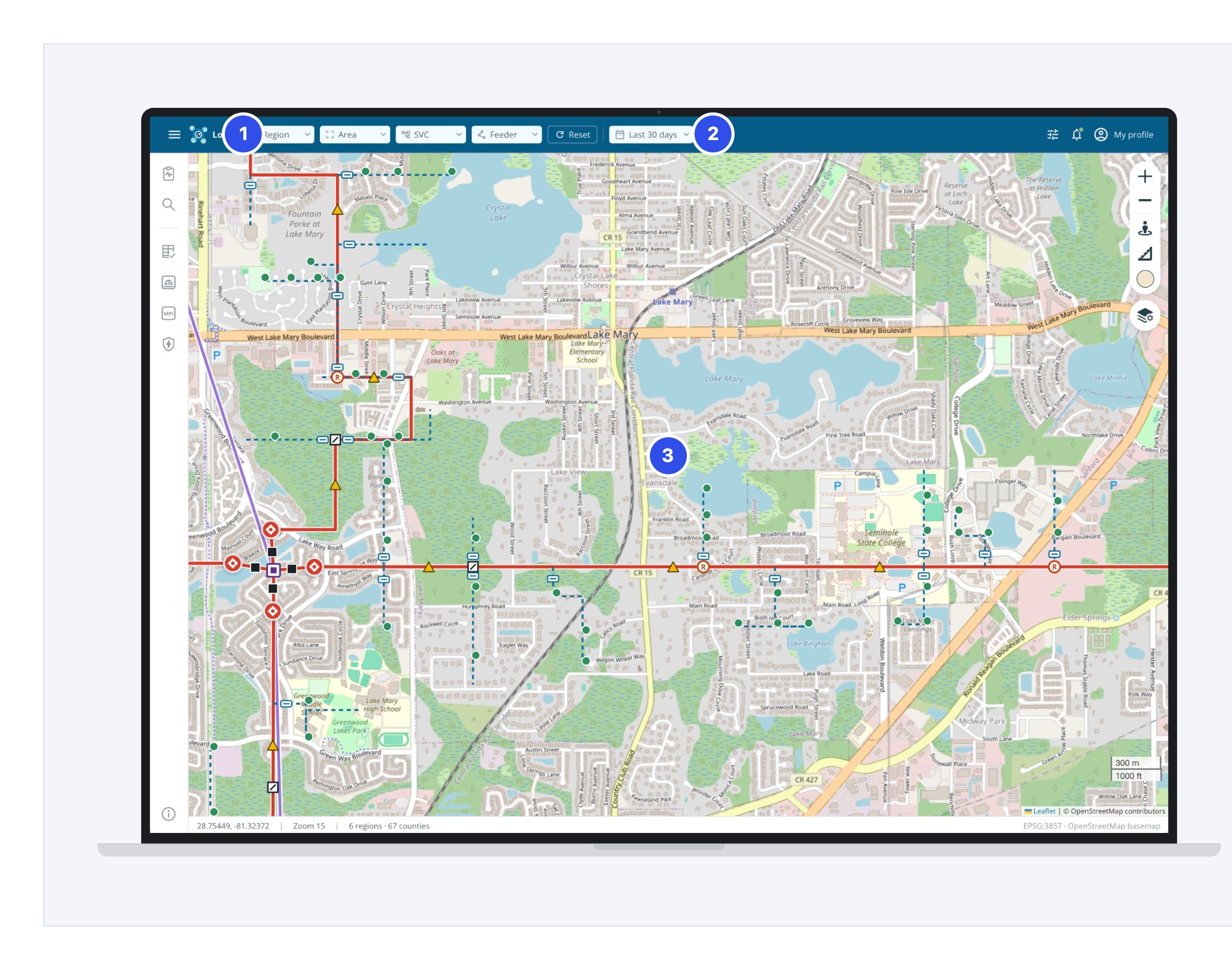
Navigation and learnability

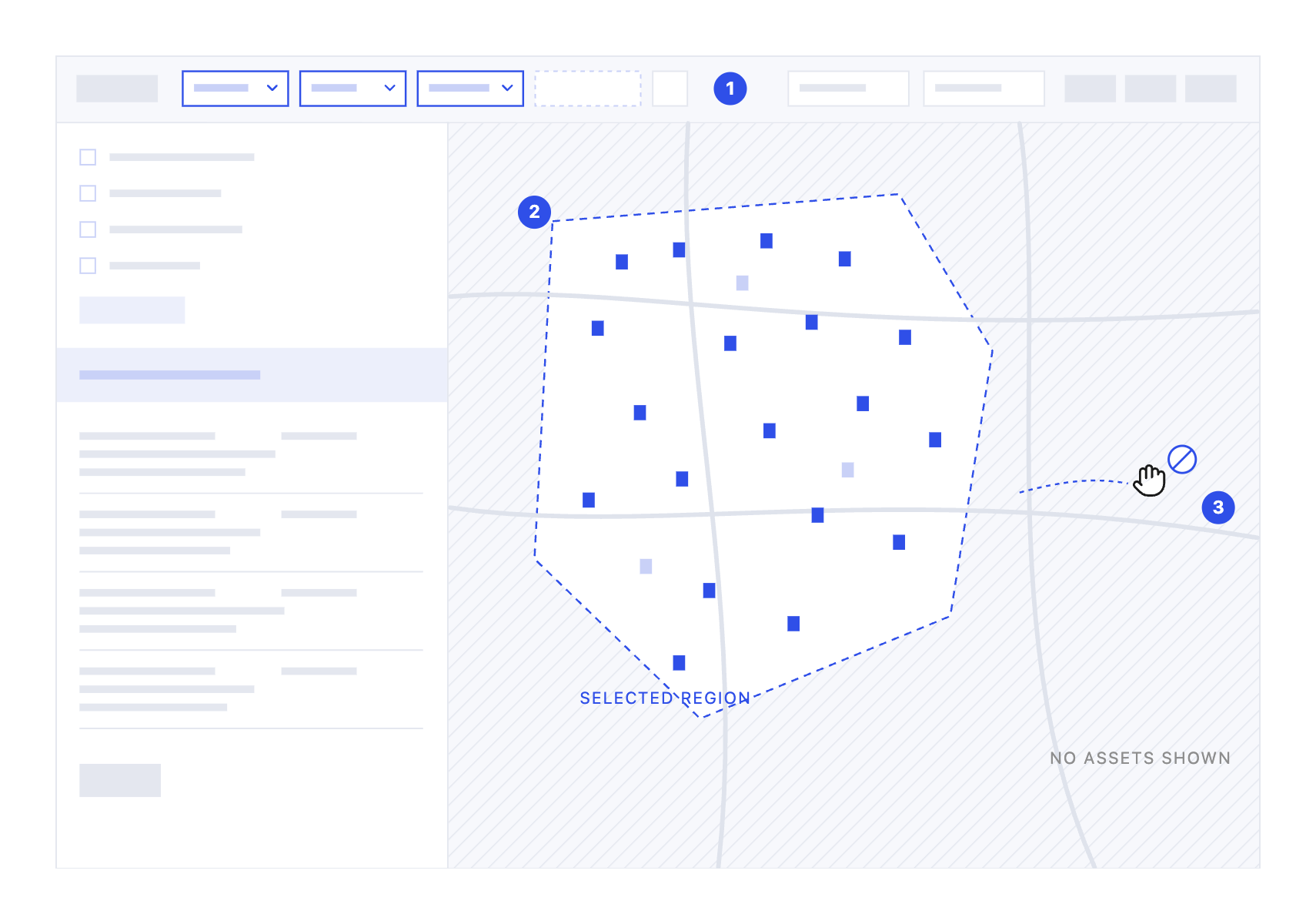
Legacy

1

Filters gate the map

Layers and assets only appear once the top-level dropdowns are selected.

2

Region comes first

A region is required, because all internal reporting and analysis happens at regional level.

3

No free exploration

Users can't pan across the map to view devices in their areas without first setting a global filter.

Why it mattered

Area Managers are accountable for regional reliability, but the work happens at individual feeders and devices, often across 3 to 4 management areas. Checking one nearby device meant resetting filters and reloading the view, which slowed investigations between outages and escalations.

Redesigned

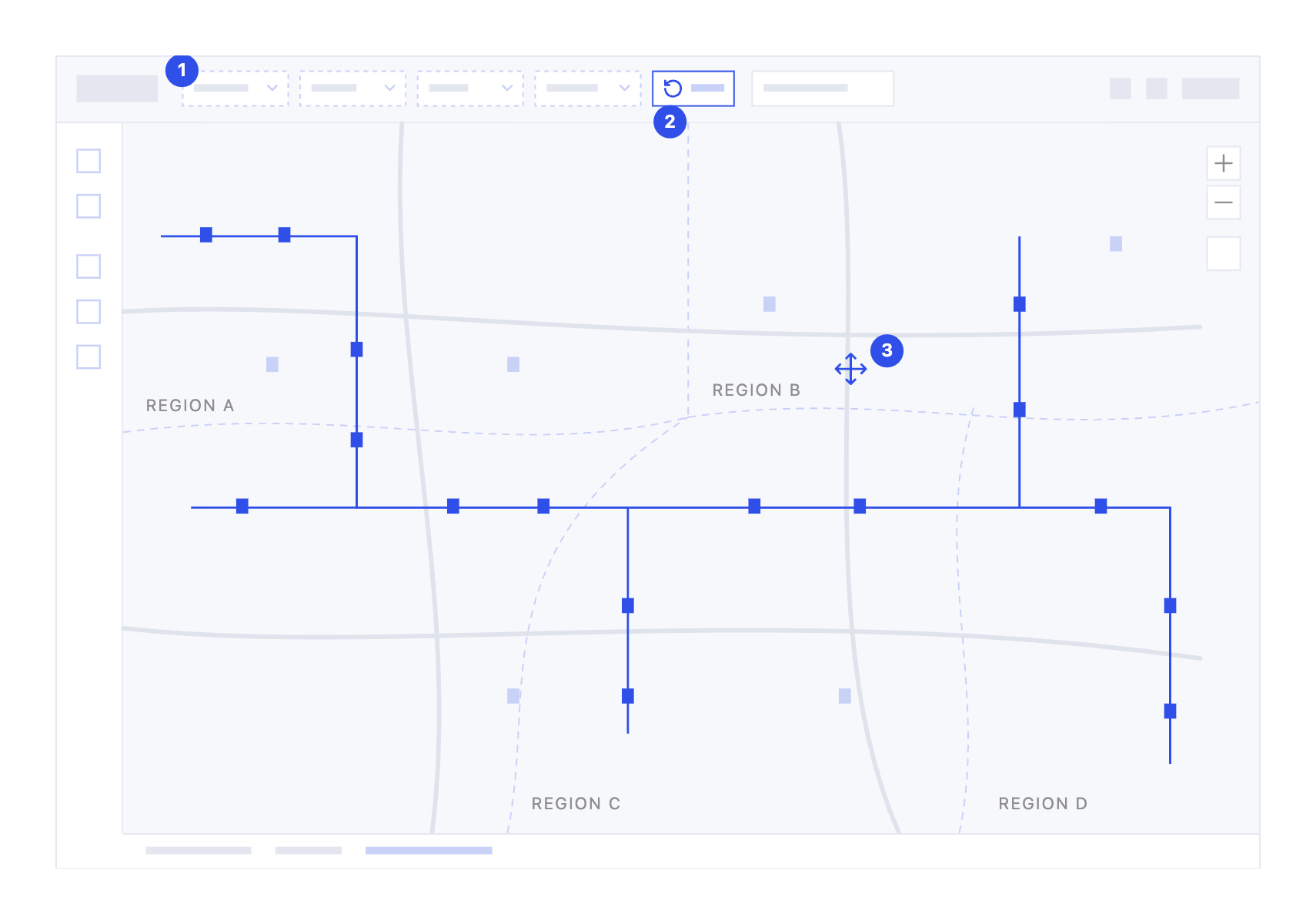
1

Filters are optional

Region still leads the bar for regional reporting, but the map no longer waits for a selection.

2

Filters refine, they don't unlock

Area, SVC and Feeder narrow the view for feeder and substation level work. Reset returns to the full network.

3

Pan across the whole network

Feeders and devices load across every region, so users can follow a feeder over area boundaries.

What changed

Users could previously see one substation at a time. They now start from the network and narrow down only when the task needs it.

Making it feasible

Make the case

Tech and API teams were concerned about load times. I researched Esri and Leaflet patterns and showed comparable applications that render full networks, to prove it was achievable.

Tune performance

The first build was too slow. We tested it over several rounds while the tech team improved loading speed, until the map was usable.

Set zoom rules

With stakeholders, we defined which devices appear at each zoom level, keeping the map readable and the load light.

Keep filters where they matter

Fault investigation still happens at feeder and substation level, so filters stayed available for that work.

What it changed for users

  • Serves several personas: a restoration specialist can now get work done just by panning the map.
  • Devices can be compared and distances measured across area and region boundaries.
  • Less training needed for new users, with strong positive reactions in reviews.

02

Fault investigation

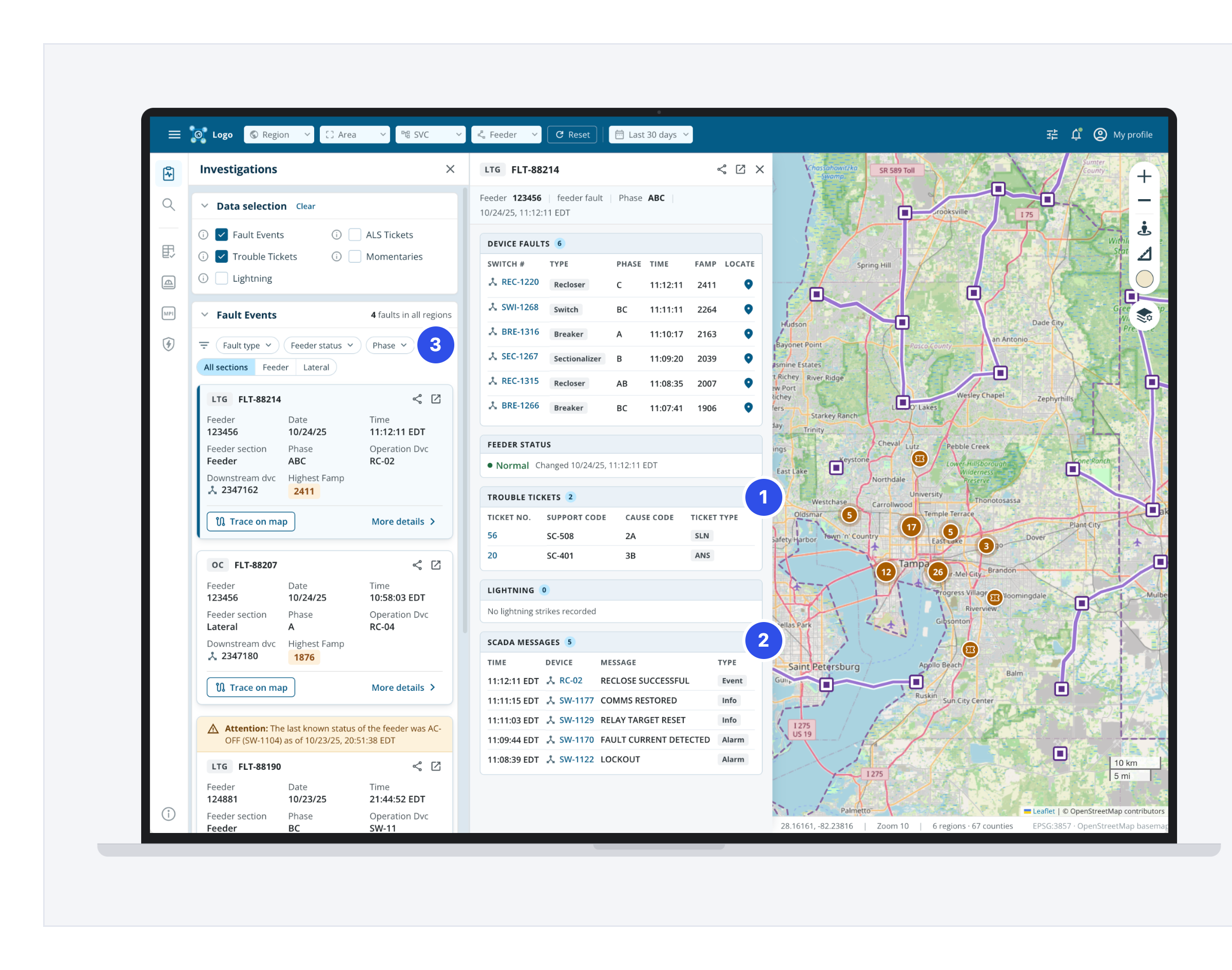
Everything needed to assess a fault was consolidated into a single event card, with the map, telemetry and related tickets alongside it. Additive search and direct access to the data layers meant investigating an outage stopped being a fight with the interface.

Legacy

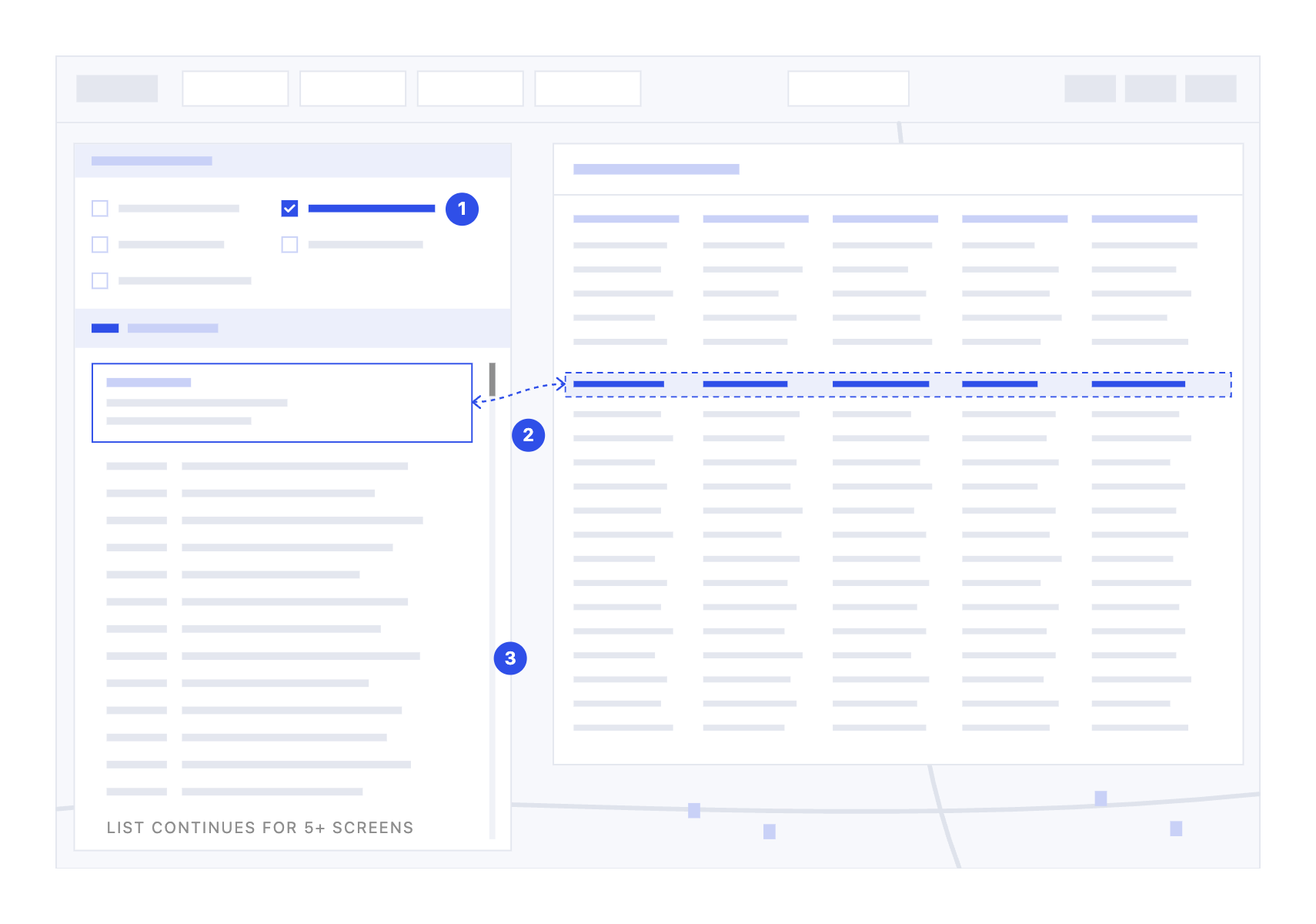
1

Context hidden behind toggles

Related data such as trouble tickets only joined the faults list after users switched it on in the investigations panel.

2

Manual cross-checking

SCADA messages weren't filtered to the fault, so for every fault users searched a separate raw log to verify the messages, like using another app within the app.

3

Endless device list

Each fault was listed with all its details, so users scrolled through 5+ screens and struggled to skim or compare faults. There were no filters to isolate one.

Why it mattered

Fault investigation is time-critical. Grid Operations Managers need to locate faults and isolate risks before they become outages. With the evidence split across toggles, a raw message log, a long device list and several browser tabs, every investigation depended on manual cross-checking.

Redesigned

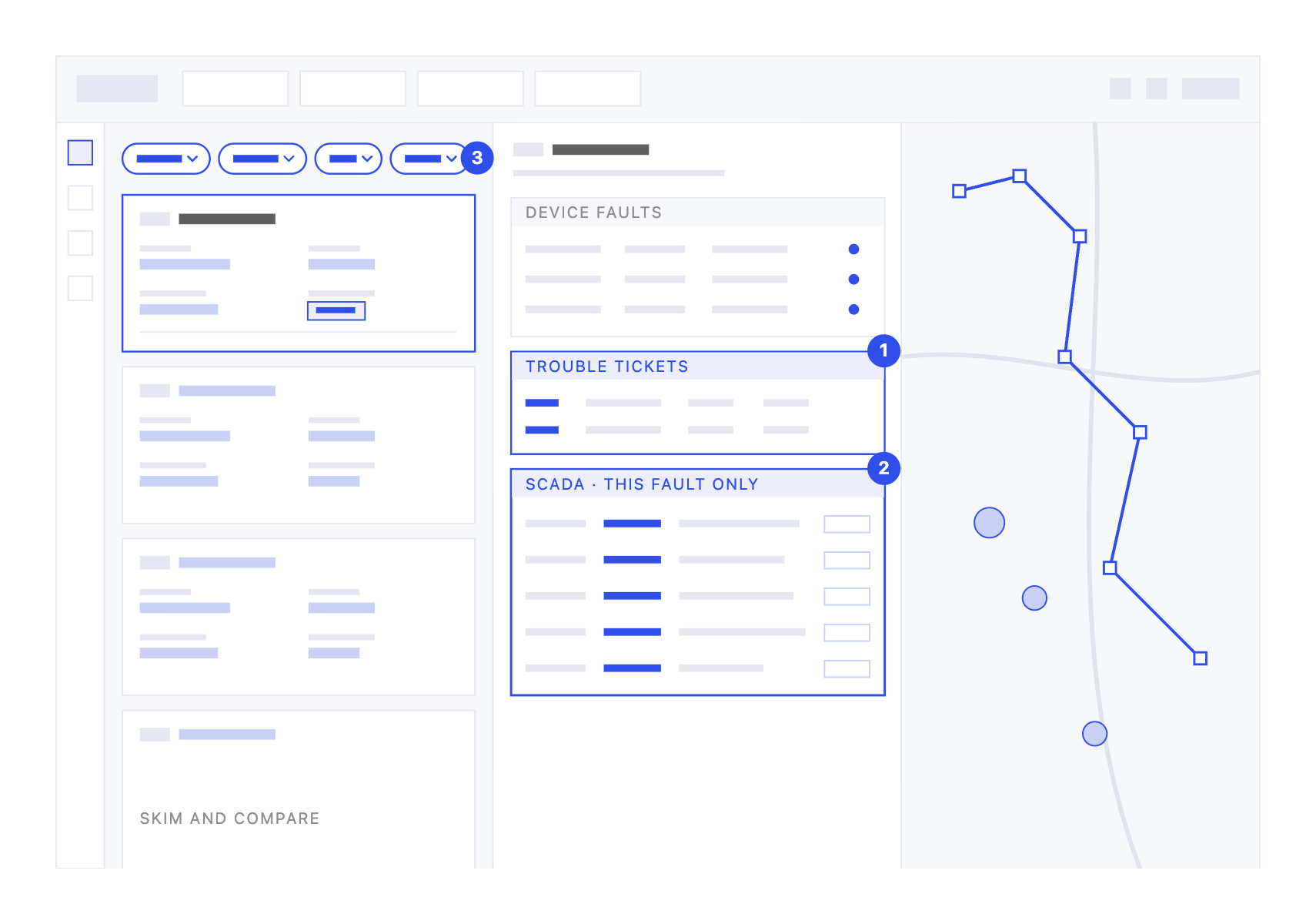
1

Context in one place

The detail view pulls in data from other parts of the app, like SCADA messages and trouble tickets, that used to need separate tabs.

2

Messages matched to the fault

SCADA messages are filtered to the selected fault, with linked devices and a clear type, so there's no separate log to search.

3

Filter, preview, then dig in

New filters for type, feeder status, phase and section isolate a known fault fast. Cards preview the key details so operators can skim and compare.

What changed

Investigating a fault went from piecing together three views to reading one. Users see what happened, which devices faulted and where they are on the map, all from the selected fault.

Comparative usability test

  • 5 of 5 users rated the redesign much better.
  • Comparing multiple fault events at once was much easier.
  • SCADA, tickets and related data sit in the details pane, instead of tabs across browsers.

Making it feasible

Align on value

The tech changes were complex, so I made the case for their value to users and operators, and aligned stakeholders and the product owner to prioritise them.

Redesign the API

Bringing SCADA and trouble tickets into one pane meant redesigning the API, plus new code to match SCADA messages to fault events.

Create a fault ID

The new filters needed a fault ID data field that didn't exist, so it was added as part of the technical change.

Shape the cards

Card fields were defined with SMEs first, then refined after user feedback sessions so each persona has what they need.

03

One platform, several operators

Reliability managers, control centre leads, customer assurance leads and restoration specialists arrive with different questions. Personalisation and multiple interaction modes let the same product serve each of them, instead of a product built for an average user who does not exist.

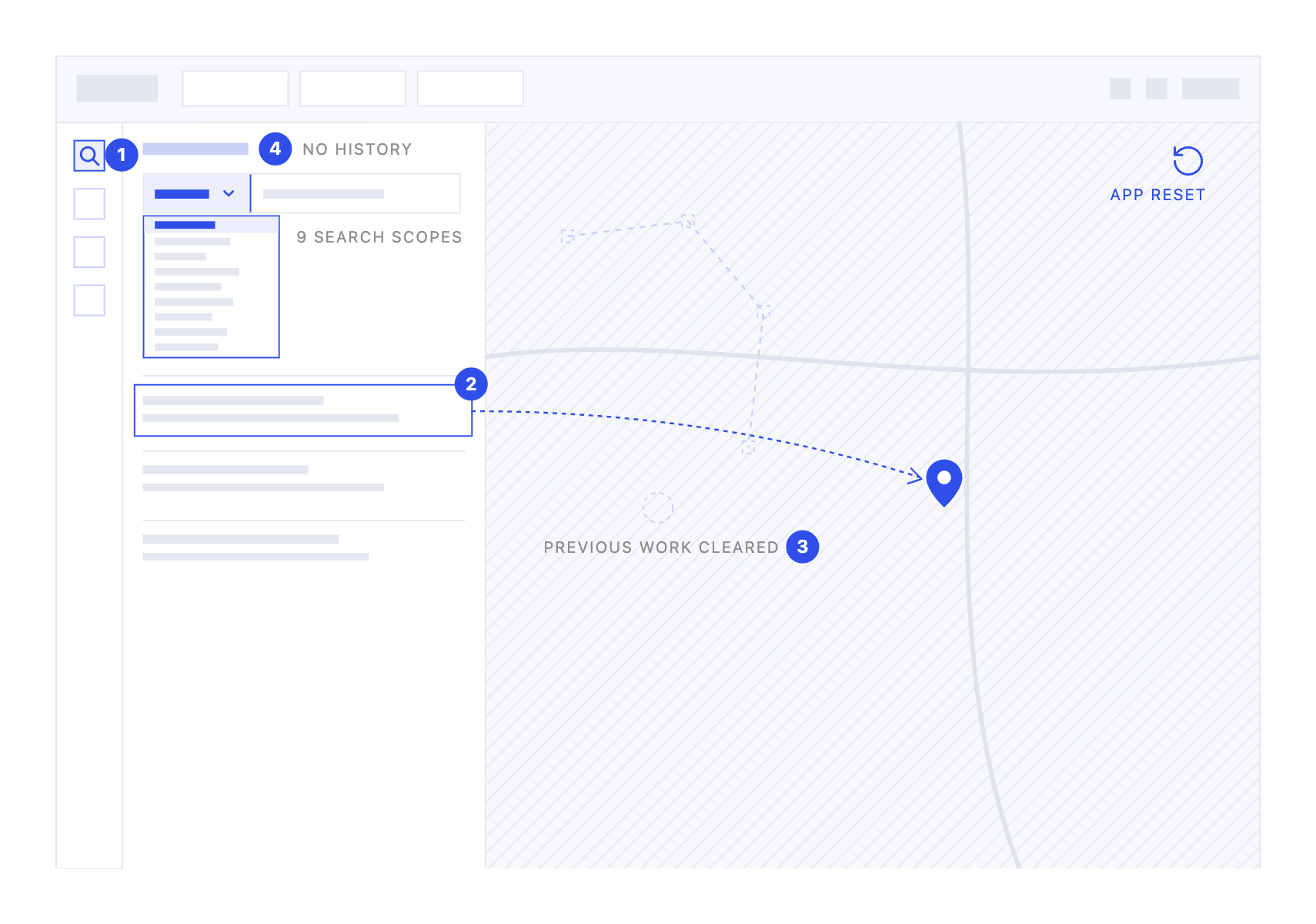
Legacy

1

Search hidden in the nav

A search icon on the left nav opened a separate panel, taking the place of whatever the user had open.

2

One result at a time

A scoped search covered 9 categories, such as address, device, feeder and ticket, but users could only act on a single result.

3

Every click reset the app

Selecting a result reloaded the whole app around it, erasing the map and the investigation in progress. There was no history or saved searches either, so users retyped the same assets each time they came back to check on their area.

Why it mattered

Investigations rarely involve one thing. Checking a second address or device meant losing the first, so users rebuilt their view again and again, or kept notes on the side to remember what they had found.

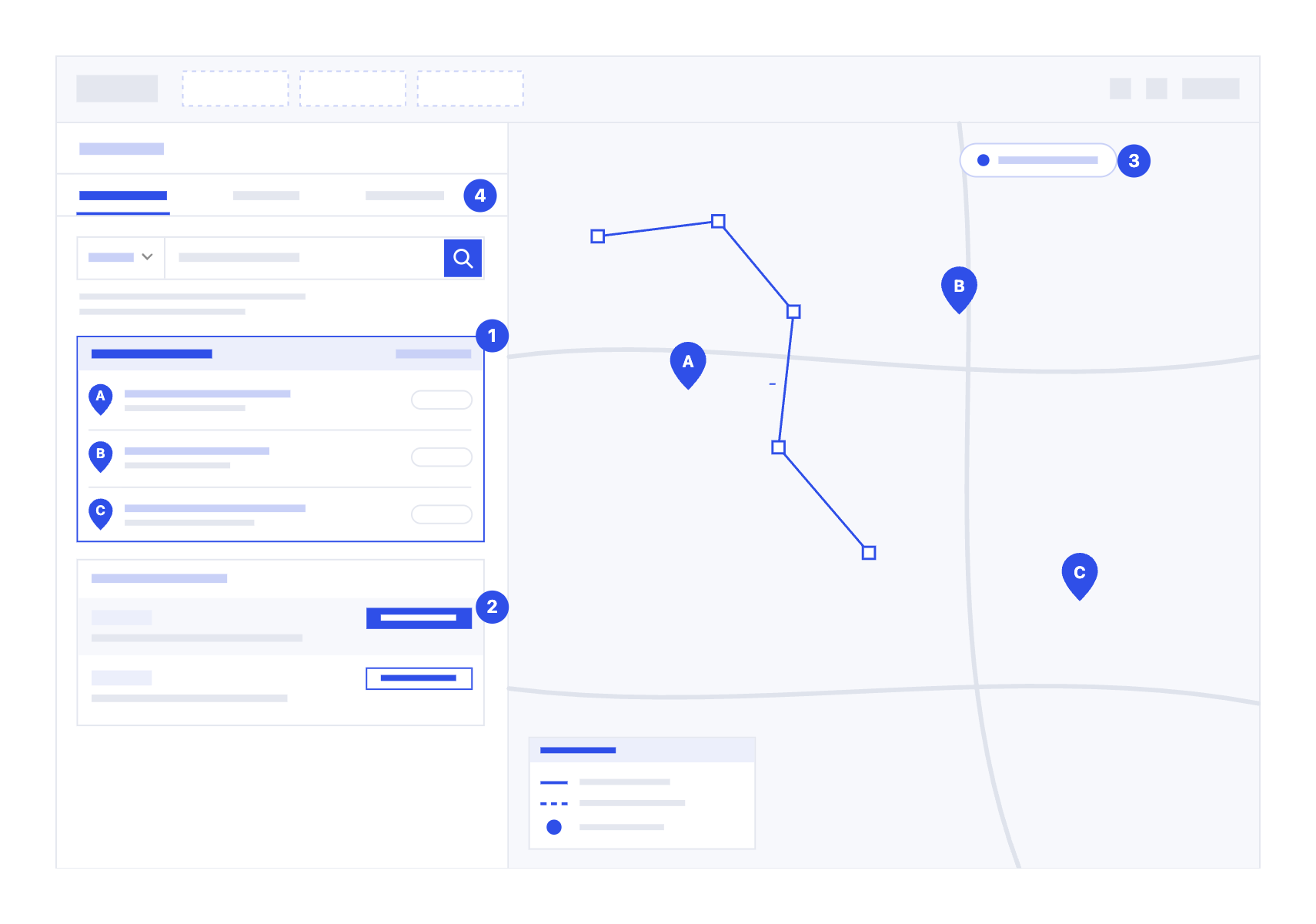
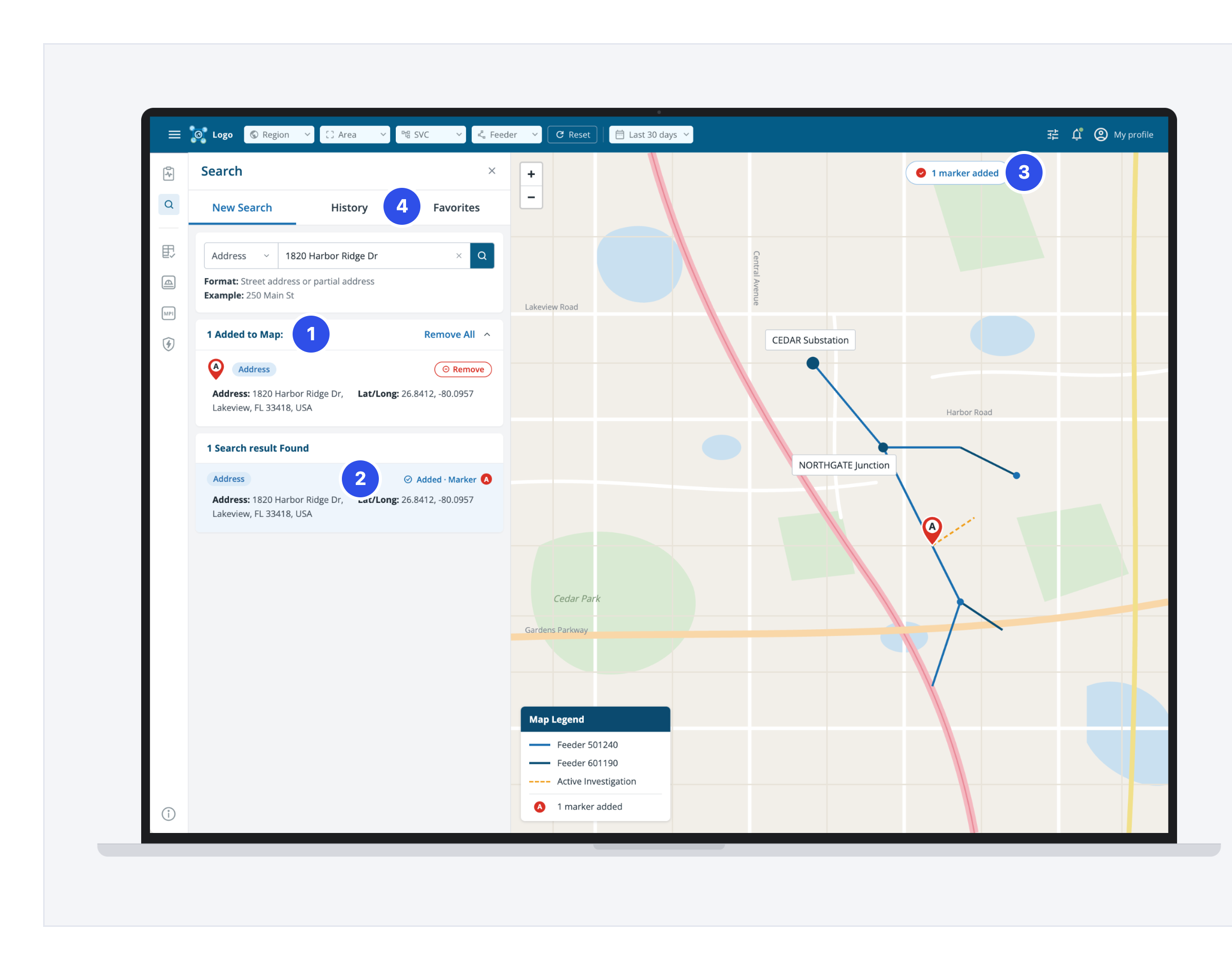
Redesigned

1

Results stack on the map

Each added result becomes a lettered marker. Users keep searching and adding, with no limit, and remove markers one by one or all at once.

2

Add without losing your place

Add to Map drops a lettered pin and marks the result as added. A new search only replaces the results list, never the map.

3

History and Favorites

A banner and the legend always show how many markers are on the map. Area Managers return to the same assets to check for updates, so History re-runs recent searches and Favorites keeps the ones they check most, one click away.

What changed

Search now builds on the investigation instead of replacing it. Users typically plot up to five points, such as addresses, devices and tickets, and compare them together on one map.

Making it feasible

Additional dev work

Keeping searches on the map, plus History and Favorites, was extra work for the development team.

Users advocated for it

The old flow erased the map and kept no previous searches, which users found highly frustrating. They pushed for adding pins.

Stakeholders prioritised it

Prototype feedback was so positive that product owners and stakeholders pushed for it to be built.

How additive search works

Search, add, repeat, manage. Pick a type and enter a query, add a result as a lettered pin, run the next search while pins stay on the map, then remove pins or re-run searches from History and Favorites.

Prototype testing

  • Users could keep their existing work while adding points to the map.
  • It matched how they investigate, so they expected it to save time.
  • Less frustration and faster investigations.
Measure

How I knew it worked

After launch I tracked adoption through the platform's usage analytics. Growth had been flat at zero new monthly visitors, so any movement was attributable. I also went back to the same ServiceNow categories I had read through during discovery, and the drop was sharpest in the ones I expected: minor navigation questions, and requests for help finding a feature.

Users told me the same thing directly. The new features were easier to navigate and reach, so new operators needed less training on where things were and what to do next.

What I could not track was how long a fault investigation actually took. Nothing in the stack recorded it, and instrumenting it was never prioritised.

What it left behind

The project became the blueprint for how work like this should run. Other teams began using the same approach: talking to users before building, writing personas, getting Figma screens validated before anything went into a sprint. None of that existed anywhere when I joined.

Engineering shipped with less rework. Because features were agreed with users and stakeholders before they were built, far fewer changes came back after release, which is where the cost of getting it wrong actually lands.

And the business came out of it with a modern tech stack. New capability no longer means working around a legacy platform.

Reflection

Takeaways that continue to shape how I work.

01

Inherited work is strategic raw material

Earlier research can become the foundation for something bigger when it is reframed against the right product question and combined with ongoing discovery. Instead of treating inherited work as fixed direction, I used it to identify gaps, validate assumptions and shape the next layer of the experience.

02

Capability slices change the adoption maths

Whole-app migrations create a binary moment: users either adopt the new system or stay with the old one. Capability slices create progressive adoption. Each slice delivers value independently, reduces migration risk, and lets users build confidence as the product evolves.

03

Design momentum during blockers compounds

Infrastructure delays do not have to stop product progress. I kept producing useful artifacts while technical blockers were being resolved: workflow maps, decision points, implementation-ready guidance. When the blockers cleared, the team had more clarity and moved faster instead of restarting from zero.

04

Engineering collaboration is not linear

Working with developers is rarely a clean handoff from design to build. Requirements, API constraints, feasibility and edge cases evolve together. I treated it as an ongoing loop: aligning early, adapting quickly, and refining decisions as constraints became clearer.

05

API contracts shape the user experience

For complex enterprise products, API contracts are not just technical documents. They define what users can see, do, filter, sort, request and recover from. Aligning on data fields, states, permissions and errors removed a lot of ambiguity between design and engineering.

Thanks for reading this far.