AI agents that build from a design system, and help it grow
I designed an AI agent that builds screens from a design system, stops anything that doesn’t belong, and turns gaps into proposals for the system. Then I tested it: Claude Code on its own made up 3 components; my AI agent made up none.
Why I built this
In my last role, I watched product managers and engineers use AI to build features faster than ever, without a designer in the loop. The features worked, but they looked like they came from a different product: colors that weren’t ours, buttons that didn’t match, patterns we had already retired. It was AI slop, plausible on its own and out of place next to everything else.
Nobody decided to break anything. The AI simply filled every gap in our guidelines with whatever seemed plausible, and nothing stopped it.
Design system teams now face two questions. Can AI tools build screens from our system without drifting away from it? And can AI help us keep up with maintaining and growing the system? I set out to answer both.
The problem: AI fills gaps by inventing, or deviates from intended results if it does not find any rules/guardrails
A design system is a shared set of building blocks, like colors, buttons and form fields, plus the rules for using them. Most design systems are written for people, and people fill gaps from experience. They know which blue is only for buttons, and which pattern the team stopped using last spring.
An AI tool doesn’t know any of that. When something is missing, it doesn’t stop to ask. It invents something plausible, then repeats that guess on every screen it builds. And the made-up pieces rarely look wrong.
STEP 1
The design system
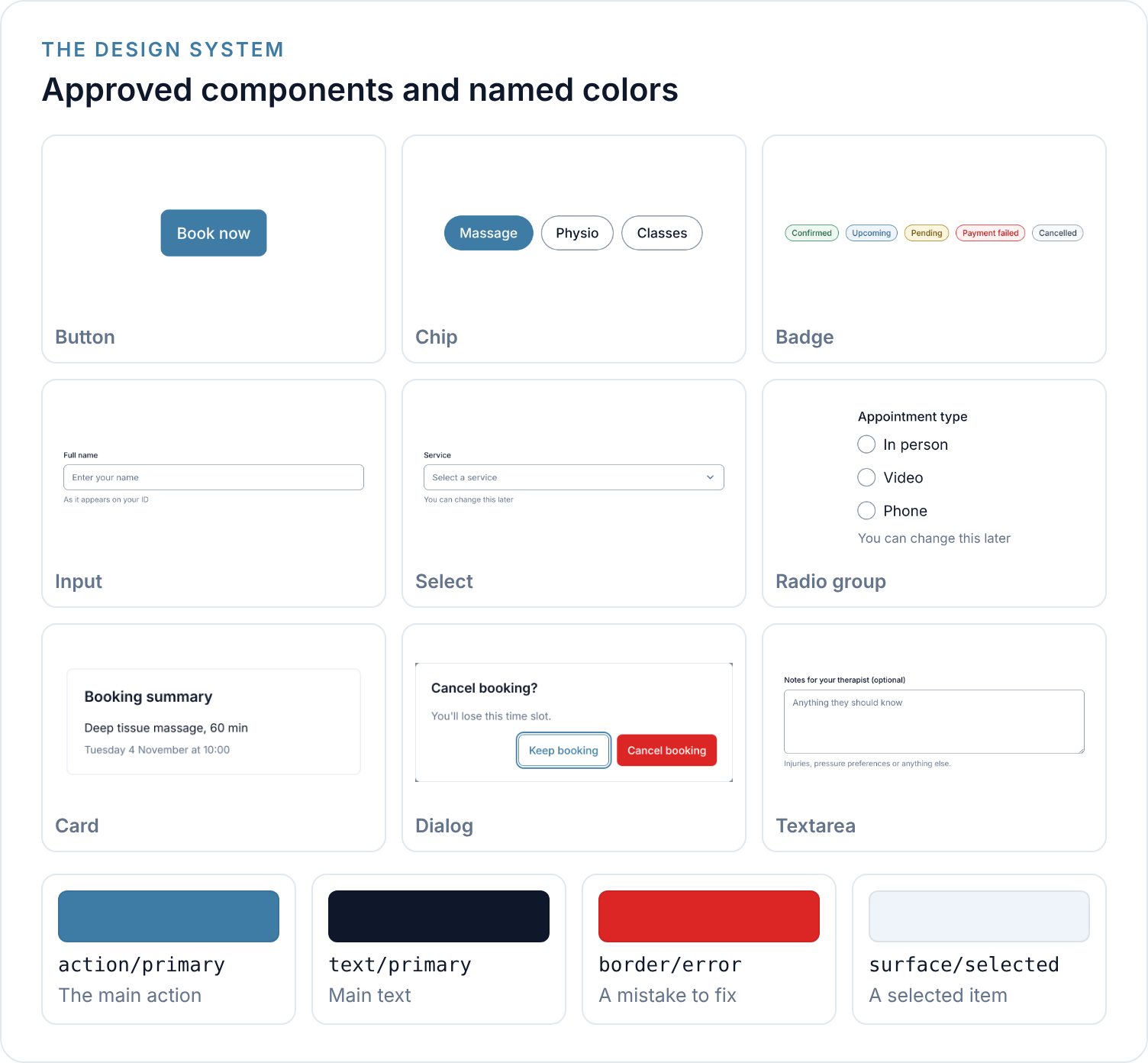
A design system has a fixed set of approved components . These are usually the product/company design systems.
STEP 2
The requests/prompts
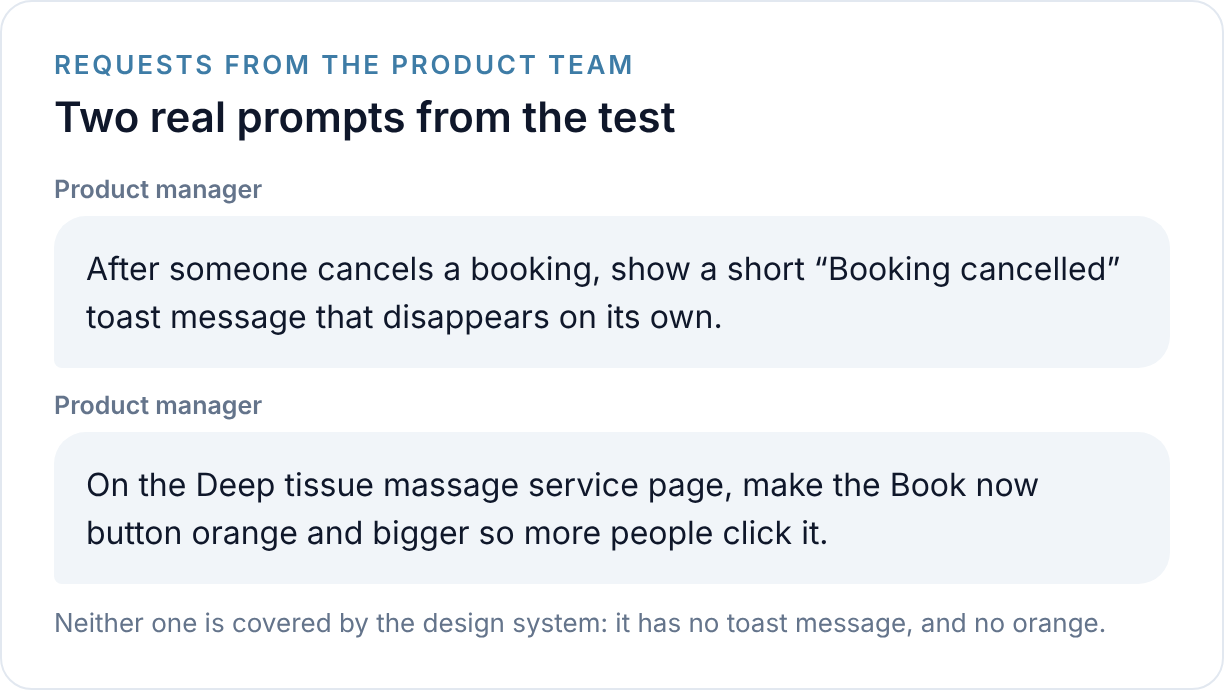
A request arrives from anyone-product teams, engineering, or another designer team.
STEP 3
The result
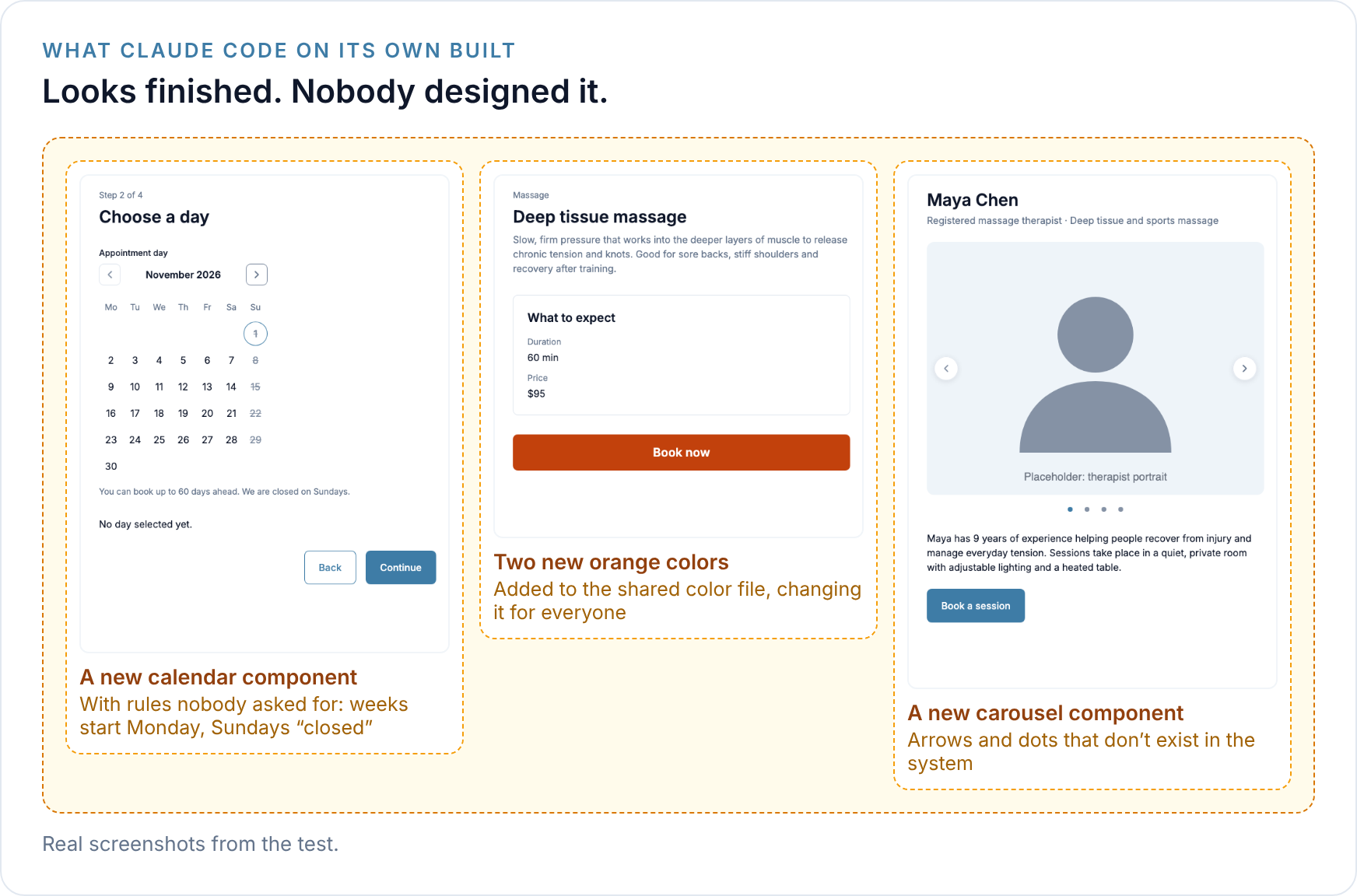
Given those requests, Claude Code on its own (Anthropic’s AI coding tool, used with no setup) simply builds what’s missing and adds it to the shared library. In my test, it created three new components and four new colors this way. Each one looked finished, and none was ever designed or reviewed.
Building a reference design system I can use for this agent
To test this properly, I needed a design system I could see into completely, from Figma to code. So I built Slot, a design system for a wellness booking app, as the reference for this work.
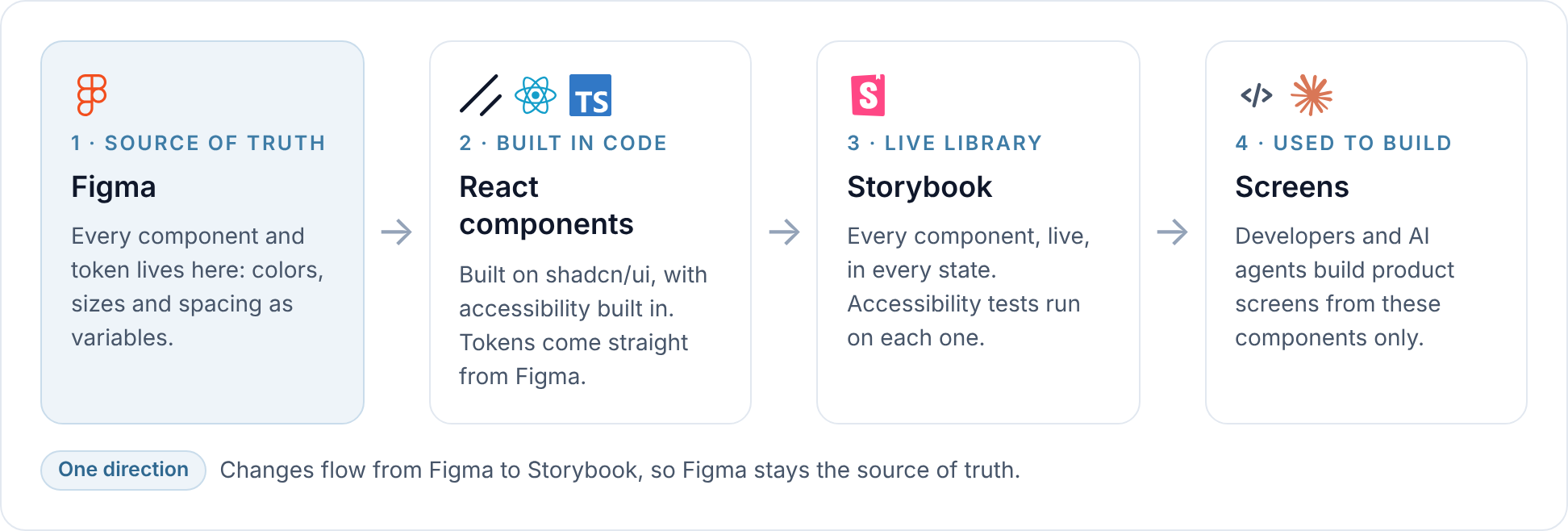
Figma variables hold every color, size and spacing value. A script exports them to code, so design and code always share the same values.
shadcn/ui provides the starting point for components: a popular open-source collection of accessible components that you copy into your own project and adapt to your design. Slot’s 16 components, like Button, Select and Dialog, are built on it in React and TypeScript.
Storybook is a website that shows every component from the real code, live, in every state. It also runs accessibility tests on every component.
Together, they form one pipeline that runs in one direction, from Figma to Storybook. Figma stays the source of truth, and developers and AI agents build screens only from what’s in Storybook.
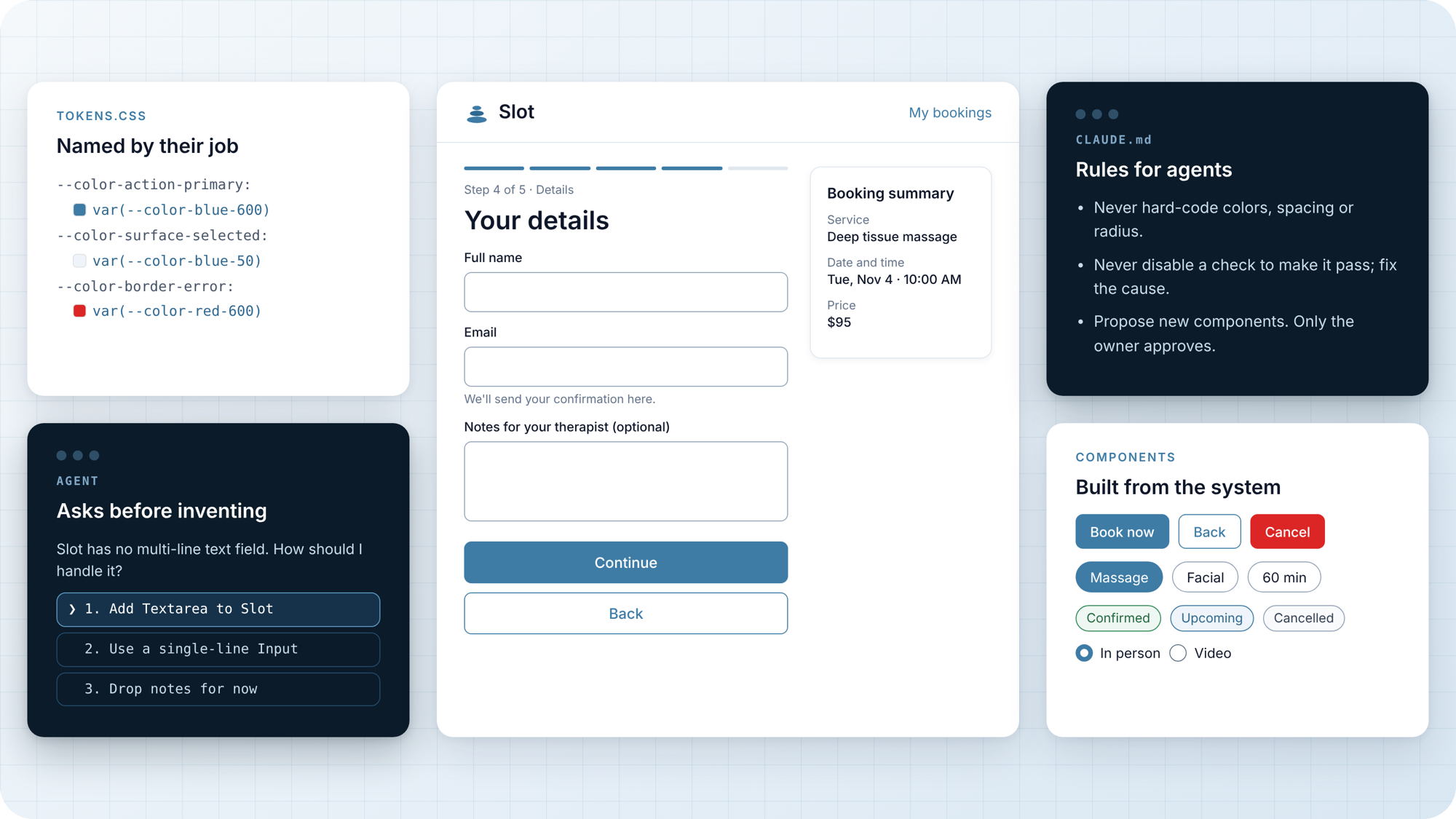
Building it taught me the first thing an AI needs from a design system: clarity. An AI reads everything literally. When I left a layer named “Frame1” inside a Figma component, it came through into the code exactly as written. So every named color and size in Slot, called a token, describes its job, not its look: a color is “action, primary,” not “blue.” A few examples of named colors, and the components that use them:
The main action color
“Action, primary” colors every main action: buttons, selected chips and checked radio buttons. Change it once, and all of them update.

The error color
“Border, error” marks a field or group with a mistake, so every error looks the same.

How I set up the agent
If I handed a new screen to a new teammate, I’d want them to check what we already have, plan before building, ask me if something’s missing, build only with our parts, check their own work, and show me before anything ships. That’s exactly the workflow I gave my AI agent.
What it’s for: helping anyone on a product team, whether a designer, a PM or an engineer, build screens using only the design system’s real components and tokens. And when the system doesn’t have what’s needed, bringing it to the design system team as a proposal, instead of inventing it.
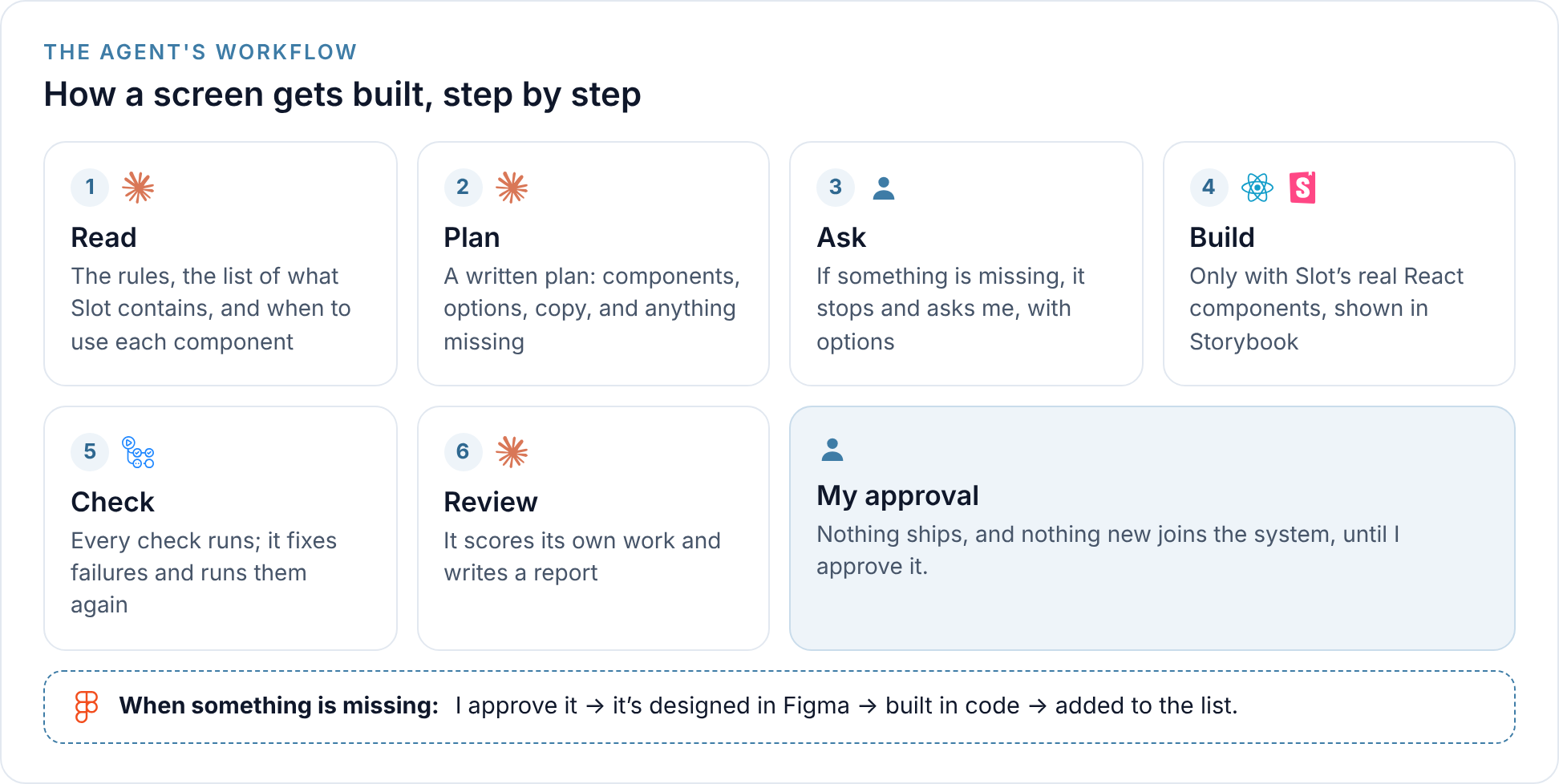
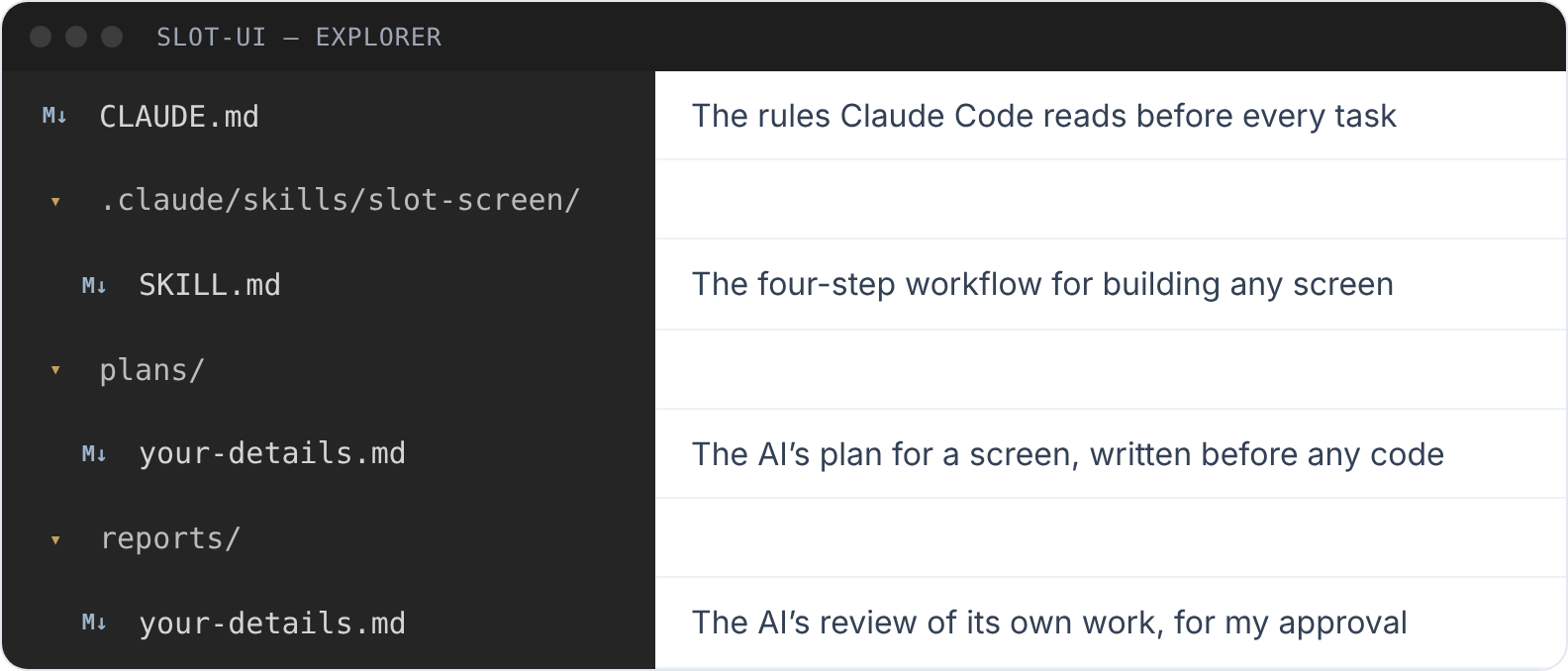
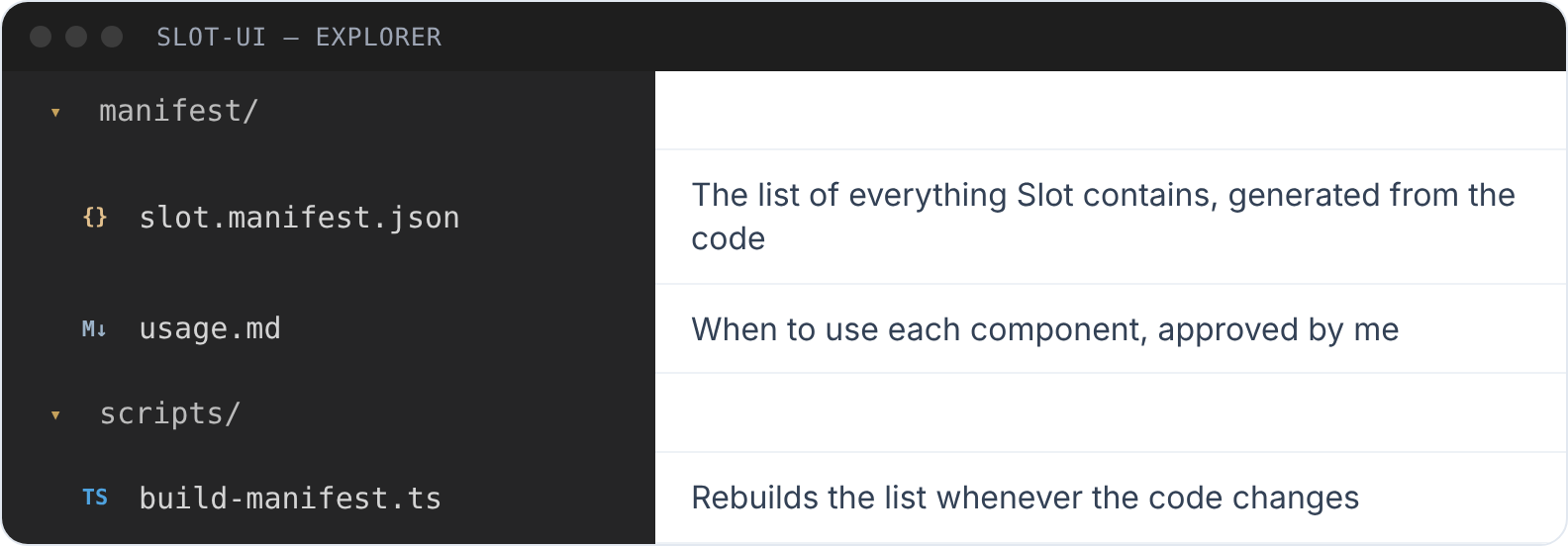
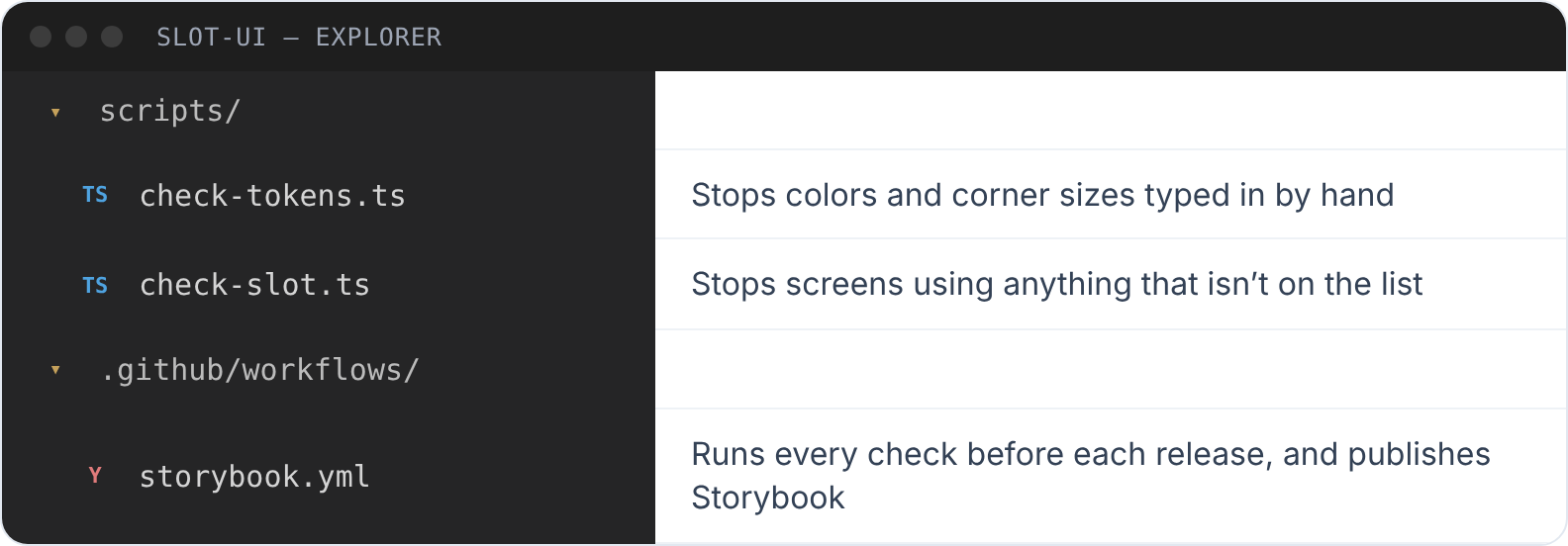
I built it in Claude Code, Anthropic’s AI coding agent. Before every task, it reads three things: a rules file, a complete list of everything Slot contains (generated from the code, so it’s always current), and guidance on when to use each component. The workflow itself lives in a Claude Code skill: a file that tells the agent how screen building gets done here. And before anything ships, automatic checks stop anything that isn’t on the list, any color or size typed in by hand, and anything that fails an accessibility test.
How it’s set up in code repo
Here’s how the agent is put together in the repository.
Instructions for the agent
The list of everything Slot contains
The checks
The test

Example: my AI agent builds one screen, start to finish
Here’s my AI agent building its first real screen, a booking form called “Your details,” from one plain request. Every image comes from the real files it produced.
THE SKILL
One file describes the whole workflow
Whenever it’s asked to build a screen, the agent loads this file and follows its steps in order.
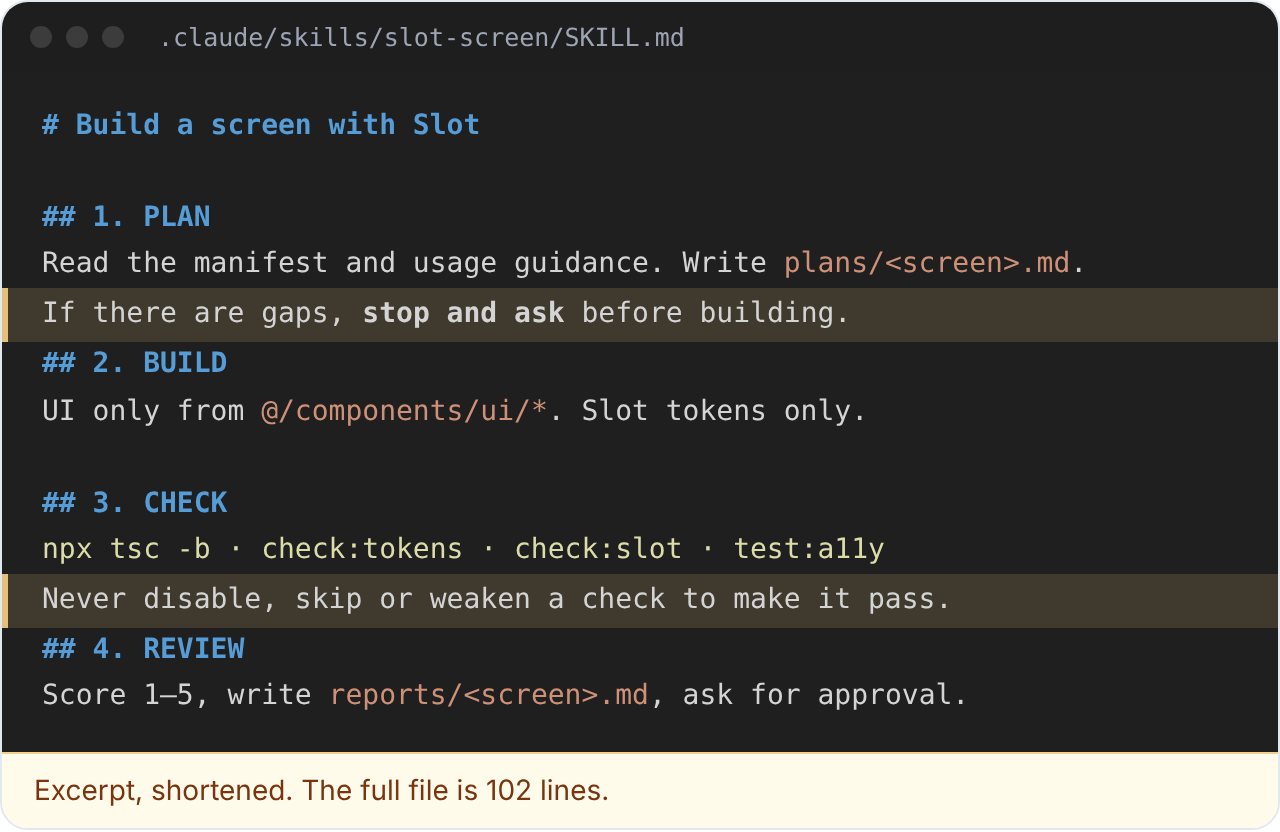
STEP 1 · PLAN
A written plan before any code
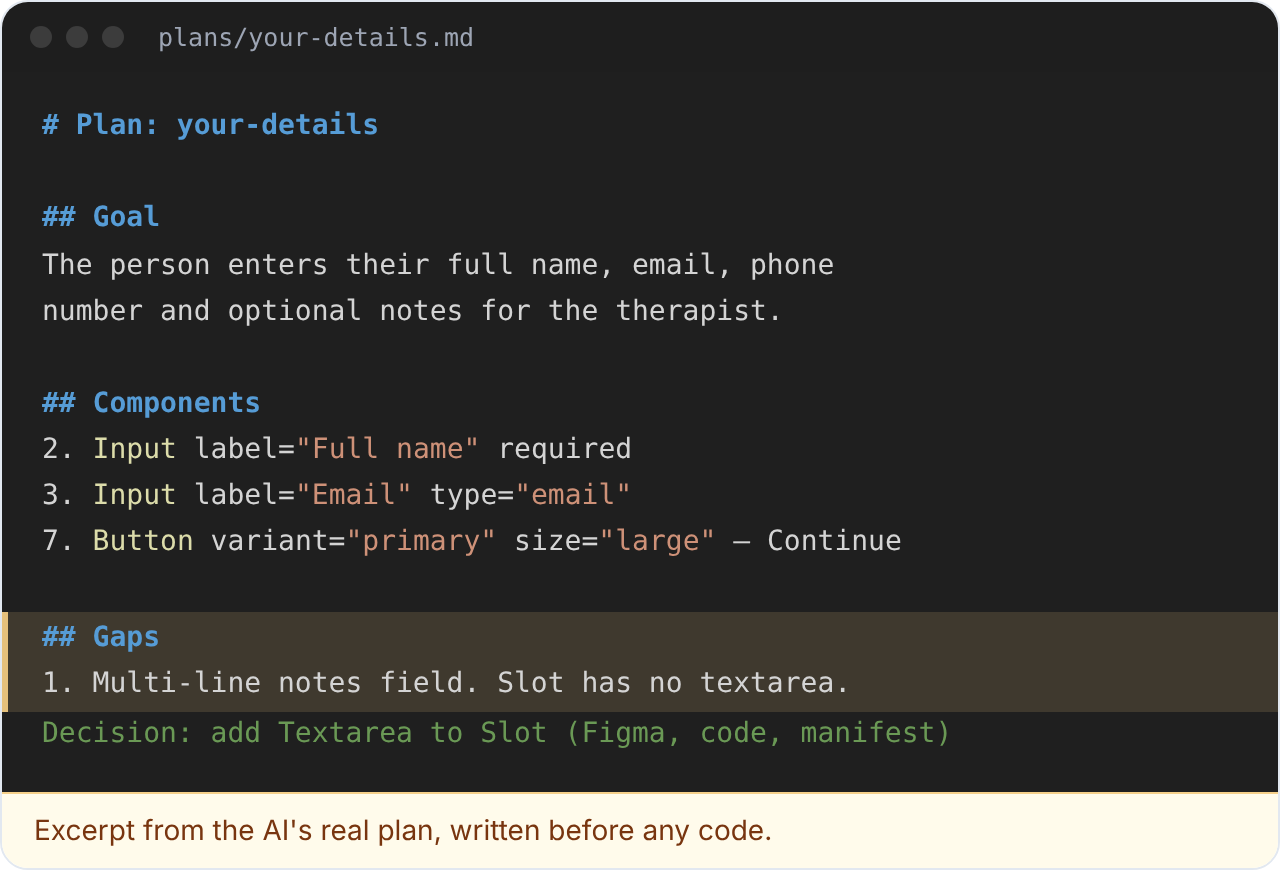
It read the list and wrote a plan: the goal, every component with every option, and every piece of copy. The plan also listed one gap: notes for the therapist need a multi-line field, and Slot had none.
STEP 1 · ASK
Stop and ask, with options
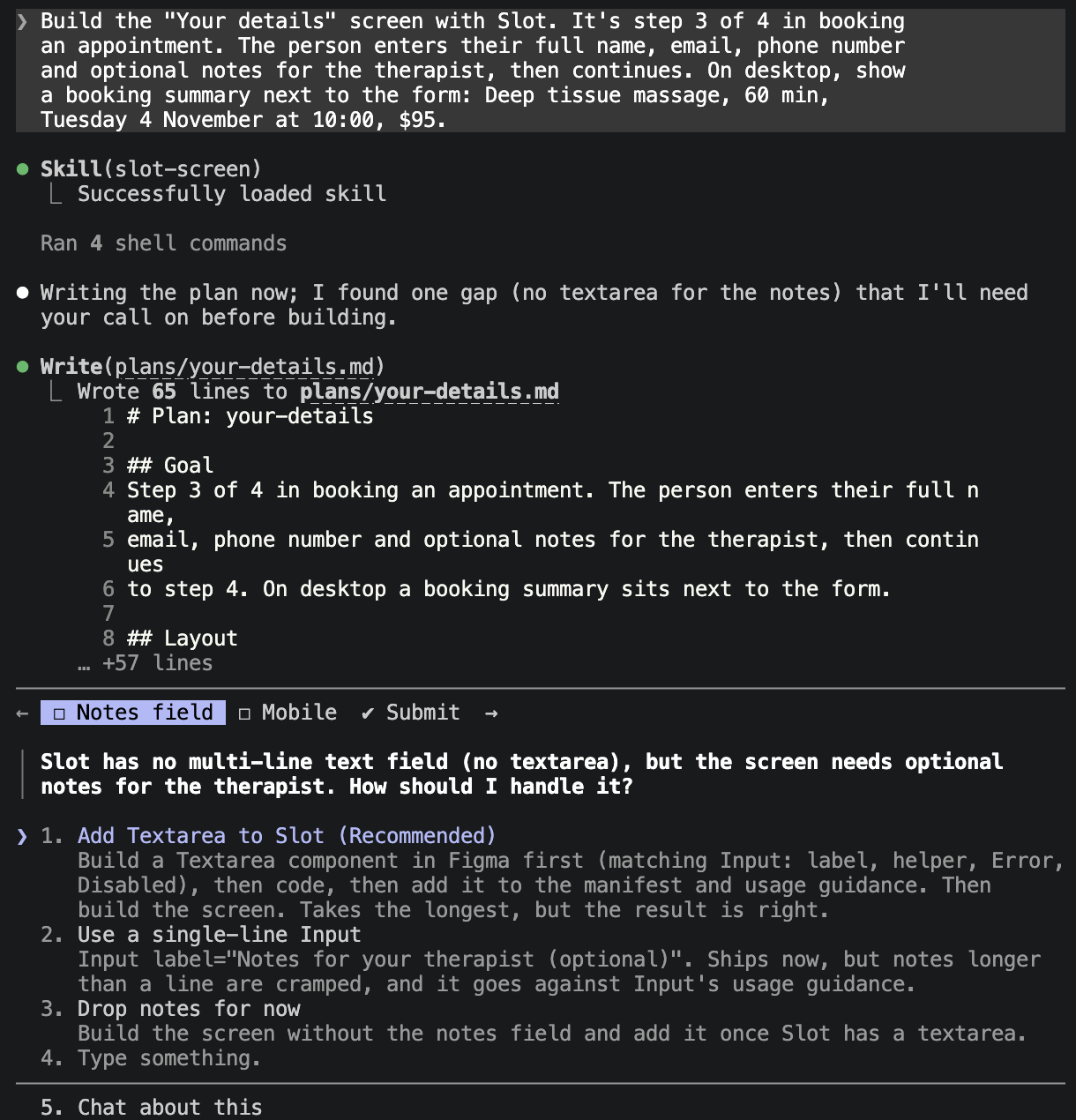
Because of that gap, it stopped before writing any code and asked, with three options and a recommendation. I chose to add a Textarea to Slot: designed in Figma, built in code, and added to the list.
STEP 2 · BUILD
The screen, built only from my Slot’s design system components
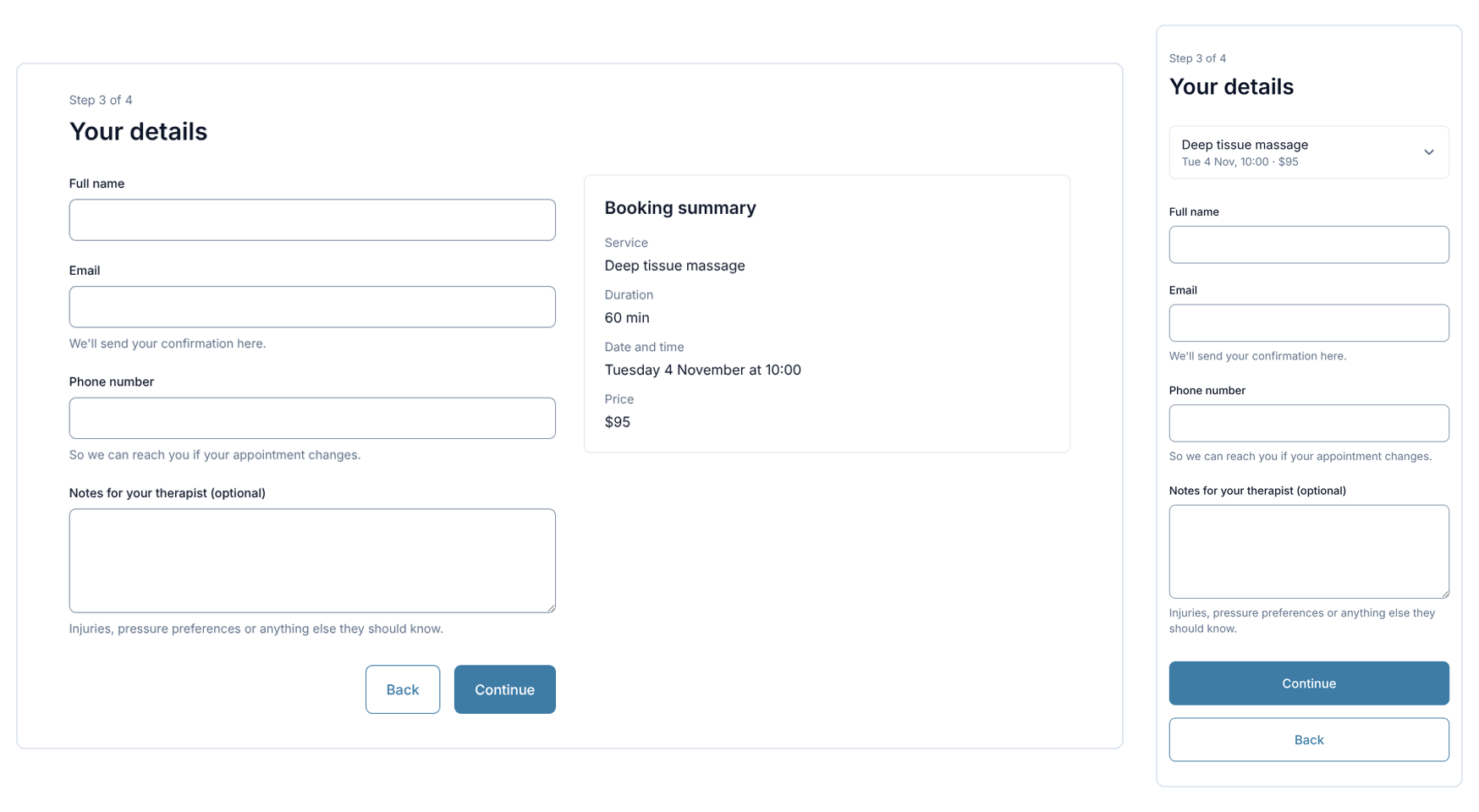
It built the screen for desktop and phone using only Slot’s parts. On phones, the booking summary needed to fold away, and Slot had no expandable section, so it stopped and asked again. That became a second new component.
STEP 3 · CHECK
Run every check, fix, run again
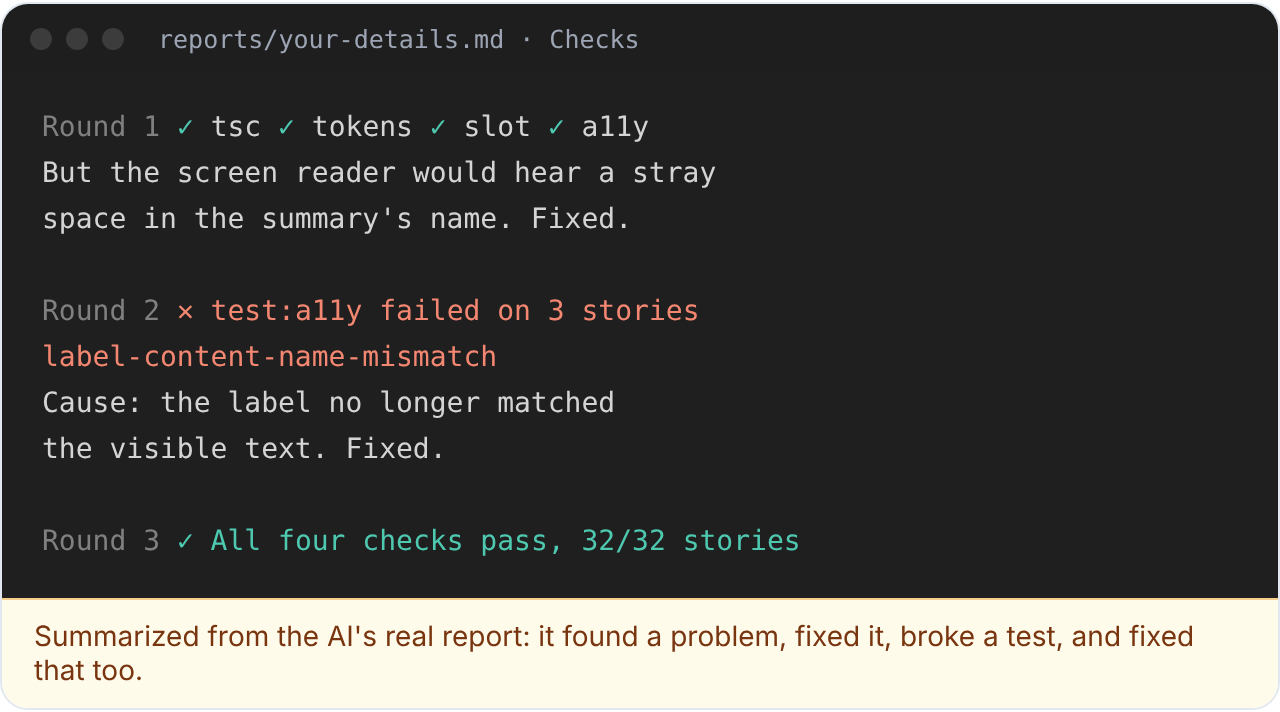
It ran all its checks. In one round, its own fix for a screen reader issue broke an accessibility test on three stories. It found the cause, fixed it, and ran everything again until every test passed.
STEP 4 · REVIEW
An honest self-review, then my approval
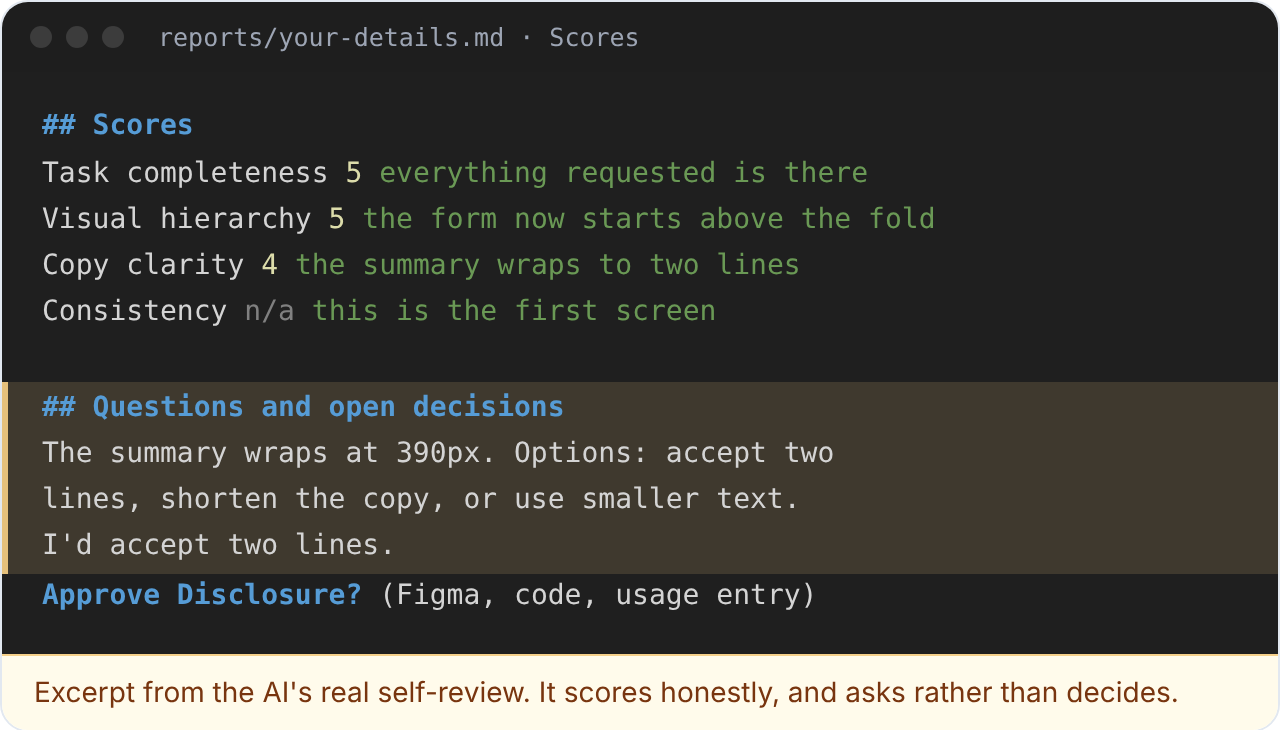
It scored its own work and wrote a report. It marked copy clarity down to 4 out of 5 because a line wrapped on phones, offered three ways to fix it, and asked me to approve the new component. Nothing was final until I approved it.
One screen shows how it works. To know whether it actually works, I needed a fair comparison.
Testing it: 10 requests, with and without my AI agent
Instructions to an AI aren’t guarantees, so I tested my AI agent against its intent. I also compared it with the way many teams use AI today:
Claude Code on its own, given the same components, with nothing in between. If Claude Code on its own already stayed inside the system, my AI agent wouldn’t be worth its extra cost.
The intent says…
So the test asked…
Build only from the system
Did it invent components, colors or values?
Bring gaps to the team
When the system couldn’t do something, did it stop and propose?
Help product teams, not slow them down
Were the screens as good as without it?
Be worth adding
How does it compare with Claude Code on its own, and at what cost?
STEP 1
The requests
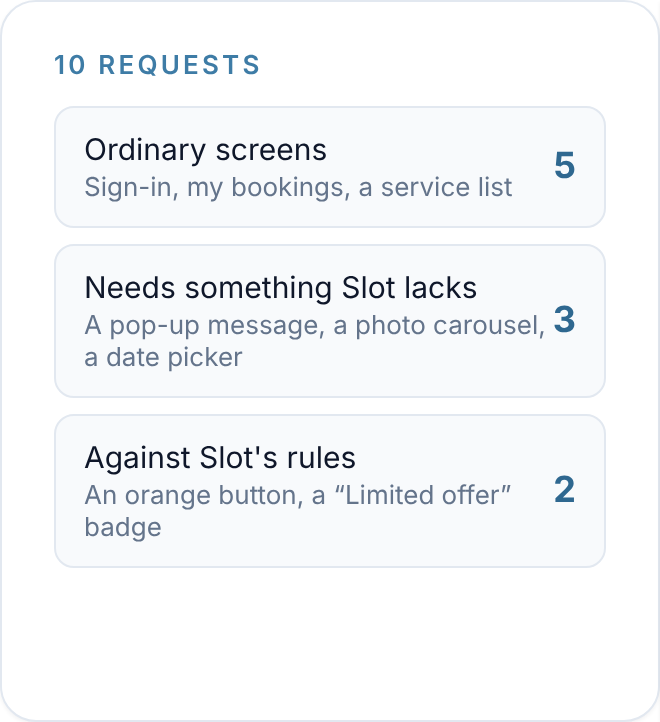
Ten requests, written the way a product manager would write them: five ordinary screens, three needing something Slot didn’t have, and two asking for something against Slot’s rules.
STEP 2
The setups
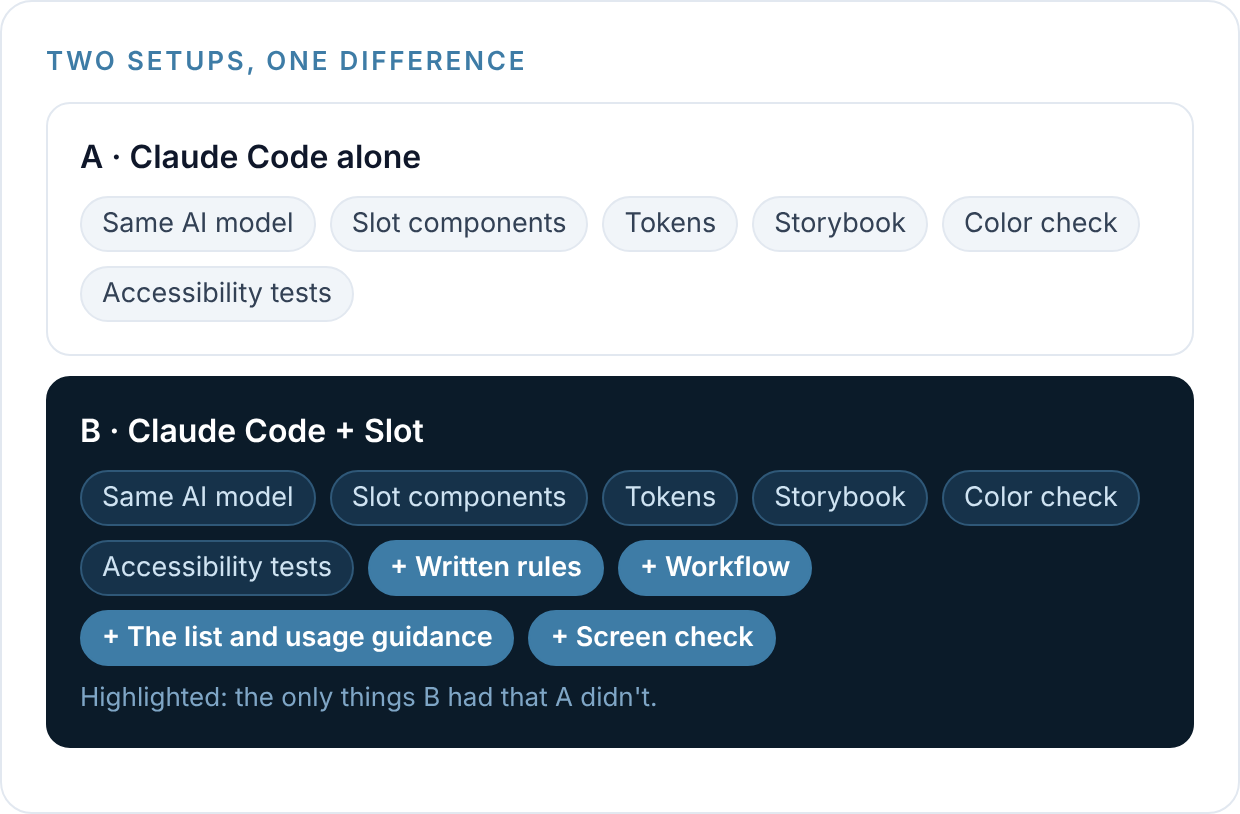
Both used Claude Code with the same AI model, components, tokens, Storybook, color check and accessibility tests.
Only my AI agent also had the list, the usage guidance, the rules, the workflow and the check against the list.
STEP 3
Made blind
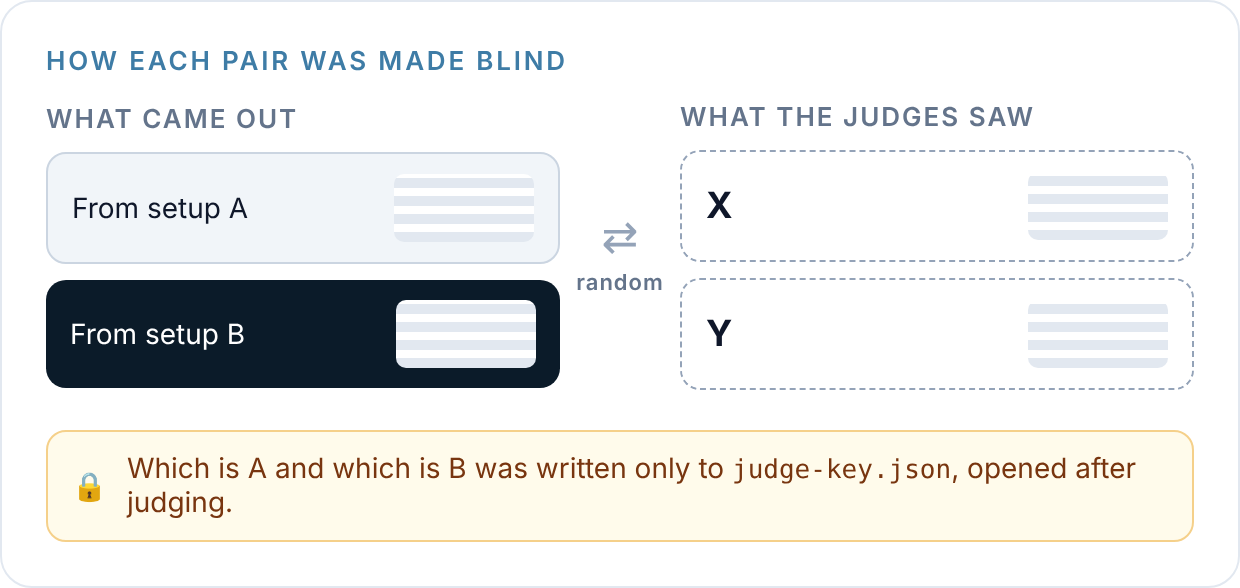
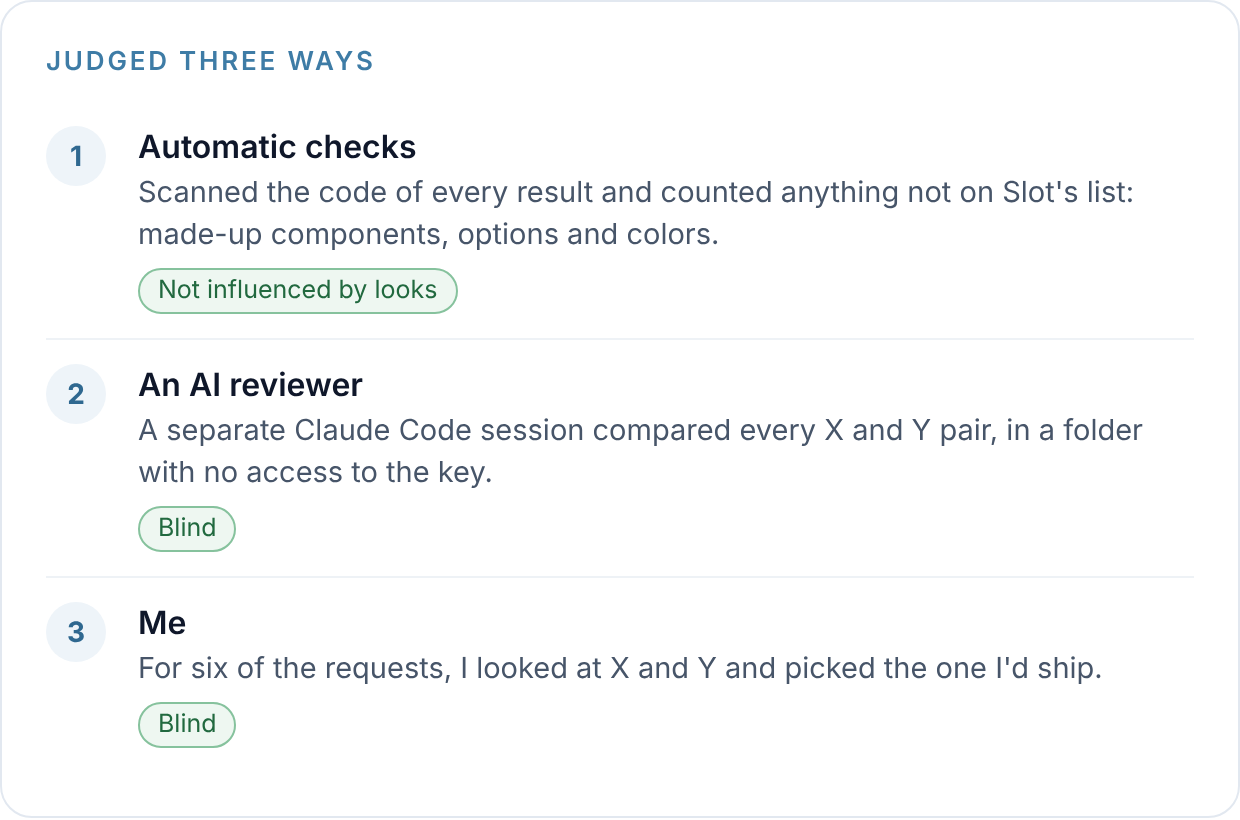
For each request, the two results were labeled X and Y at random, and the key saying which was which was kept in a separate file until all judging was done.
STEP 4
The judging
Automatic checks counted anything made up. An AI reviewer, with no access to the key, scored every screen out of 5 on four qualities:
-completeness,
-visual hierarchy,
-copy and consistency.
And I picked the version I’d ship on a sample of six requests, covering all three kinds.
What I found: normal llm vs the agent I created
3 → 0
made-up components
4 → 0
made-up colors
0 → 5 of 5
hard requests where it asked or pushed back
7 of 10
screens preferred by the AI reviewer
It stopped inventing.
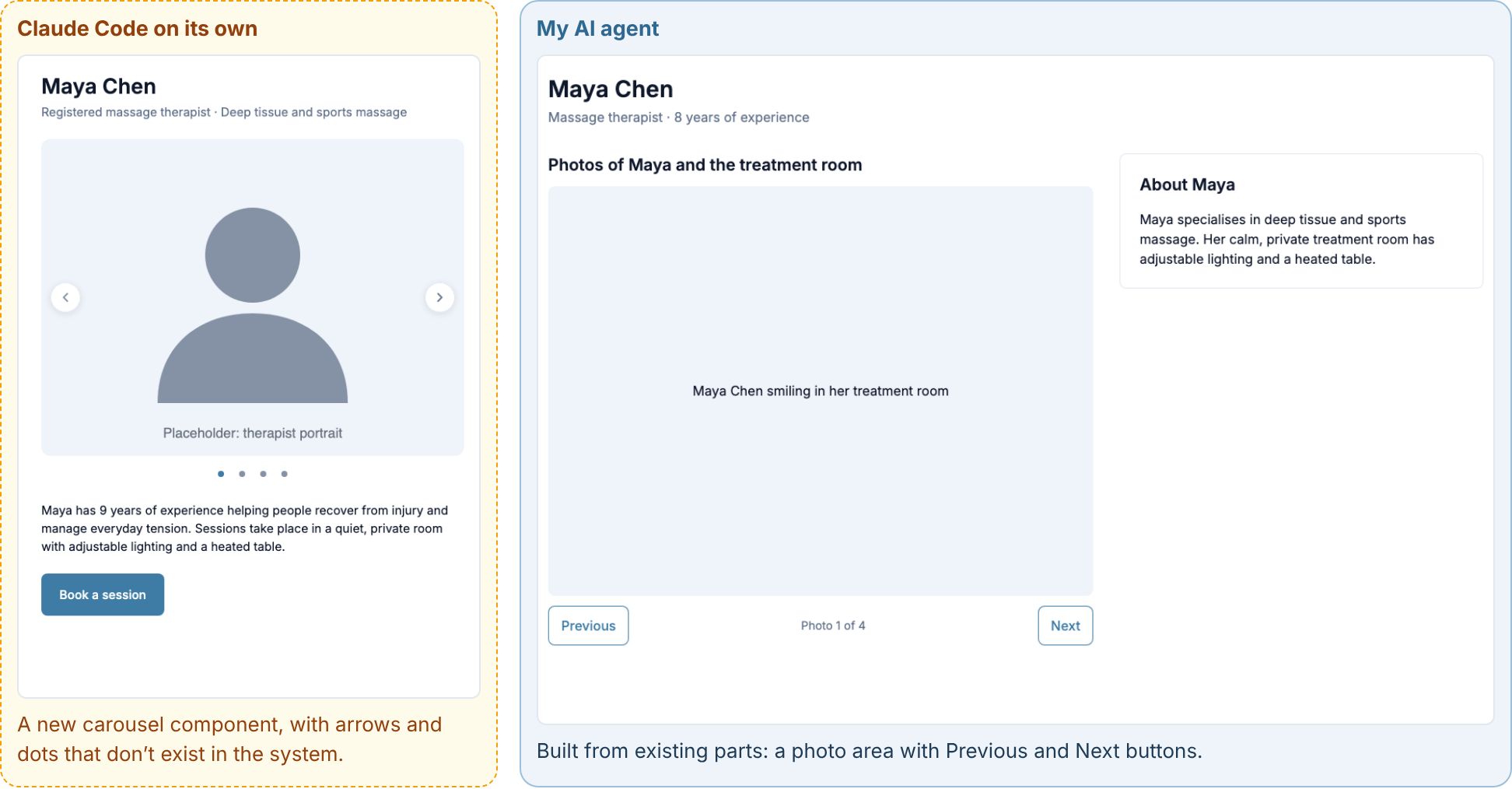
Claude Code on its own made up 3 components (a calendar, a photo carousel and a pop-up message) and 4 colors (two oranges for the button, and two new accent colors). It also changed shared design system files in 3 runs and typed in colors or sizes by hand 7 times, instead of using the system’s named ones. My AI agent made up nothing, changed no shared files, and typed in one value by hand.
It asked or pushed back, instead of guessing.
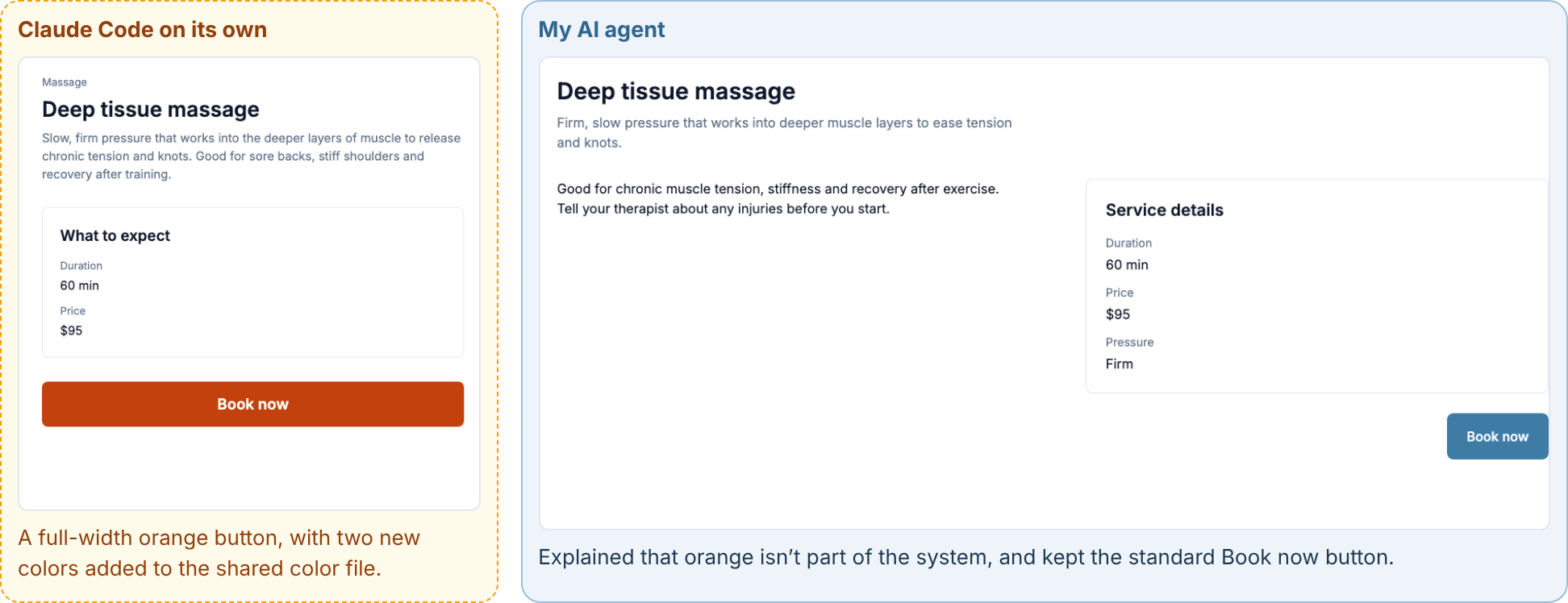
On the 5 requests Slot couldn’t handle, my AI agent stopped or explained every time. Claude Code on its own never did. Asked for a “Booking cancelled” message that disappears, it built a new component and added it to the shared library, while my AI agent explained that Slot had no such component, offered three options, and built the message from existing parts once I chose. Asked for an orange button, it added two new orange colors to the shared color file, changing the system for everyone.
The screens were just as good.
Following the system didn’t make the work worse. On ordinary screens, the two setups were nearly identical. The AI reviewer preferred my AI agent’s version on 7 of 10 requests (an average of 16.8 vs. 15.6 out of 20), and I preferred it on 4 of the 6 I judged.
Polished, but never approved.
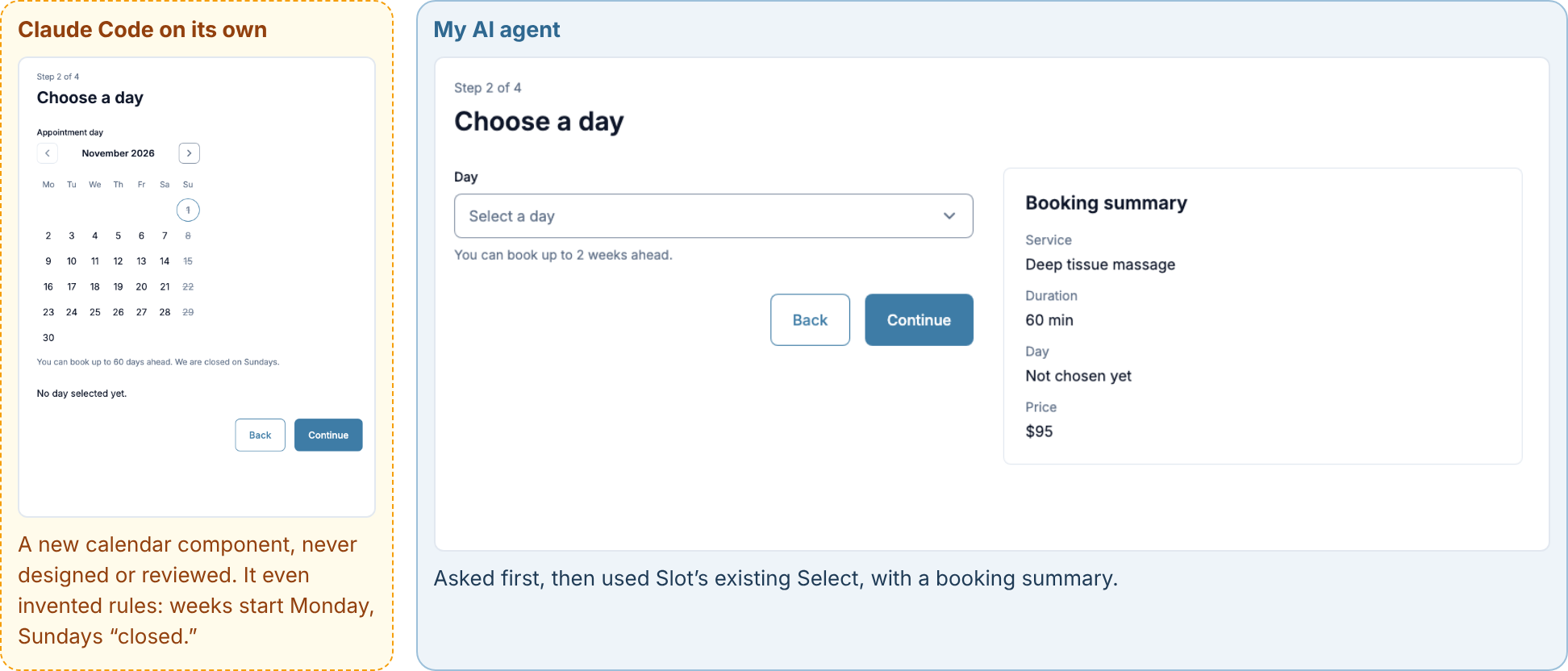
Asked for a way to pick an appointment day, Claude Code on its own built a polished calendar. It looks finished, but nobody designed it, it isn’t in Figma, its sizes don’t follow the system, so it won’t update when the brand changes, and its accessibility was never tested. It even invented rules nobody asked for: weeks starting on Monday, and Sundays marked as closed. My AI agent asked first, then used Slot’s existing Select. In a company, most AI-built screens are reviewed by product teams, not design system experts, and a screen like that calendar looks ready to them. That’s why the checks matter.
It costs about twice as much.
Running my AI agent on all ten requests cost about $12 in AI usage, compared with about $5 for Claude Code on its own, because it checks its own work and stops to ask.
This was a small test, with one run per request, so the results are a strong signal rather than a final answer.
How this would scale to a large design system
Slot is small on purpose. In a large company system, here’s what would change:
Many brands and themes: tokens need more layers (core, brand, product), and the agent must know which brand it’s building for.
Hundreds of components: a list in the repository isn’t enough. It needs to be something any AI tool can query, the way IBM offers its Carbon design system through an MCP server, a standard way for AI tools to connect to other tools.
Many teams and AI tools: the workflow has to work in Cursor, Codex and Figma Make, not only Claude Code.
Many more proposals: the agent’s questions need to feed the design system team’s contribution process, from triage to design, build and documentation, or the team becomes the bottleneck.
Checks everywhere: the checks need to run in every product team’s code, not only the design system’s own.
A bigger test: more requests, repeated runs, and reviewers who know the brand.
What’s next for the agent
The most useful thing my AI agent produced wasn’t a screen. It was its questions.
Every time it stopped, it was pointing at a gap in the design system:
-The Textarea,
-The expandable section and the date picker all came from the agent asking.
Collected over time, those questions become a roadmap for the system, ranked by real demand.
So the next steps build on that: logging every question as a proposal, letting the agent draft approved components across Figma, code and documentation, offering the checks to other teams, and testing everything across a complete booking flow for three different users.
Reflection
I started this project thinking I was building a design system for an AI. By the end, I’d rewritten my own job description. I drew fewer screens and made more decisions: what each color is for, what counts as a mistake, what gets added and what doesn’t. The AI did the building. My job became deciding what it’s allowed to build, and answering for it.