Securitas Technology · Client project · 2022
Secu-Rita
A conversational support assistant that lets Securitas Technology’s customers handle common requests themselves, instead of waiting 15 to 20 minutes on the phone. Our research and recommendations shaped the next update of Securitas’s support chatbot.
Overview
About Securitas Technology
Securitas Technology provides access control, remote monitoring and intrusion systems for commercial and residential spaces. Its most-used management app, HQ, lets security managers monitor their buildings remotely, check system status and respond to notifications.
My role
I worked across the project: planning the research, the literature review and competitive analysis, user interviews, facilitating affinity mapping and analyzing CallRail call data, then user and chatbot flows, prototyping, interface design and usability testing.
The challenge
After the onset of Covid-19, support calls to Securitas surged. Customers waited longer, more of them hung up, and the customer care team was overloaded. Securitas already ran a support chatbot, but customers still picked up the phone for most of their questions.
The brief
“After the pandemic, our customer service experience suffered from the surge in support calls and a shortage of staff. We want to give customers a quick, hassle-free alternative.”
Meet Secu-Rita
A conversational assistant that is quick, human and helpful, built around the tasks customers called about most.

Human conversations, not robotic replies
Short, precise replies with a human touch, written to acknowledge the customer’s problem before solving it.

Learns what customers need
The more questions it handles, the better it recognizes what a customer is asking and where to send them.

Confirms before it acts
Before carrying out any task, Rita checks with the customer, which builds trust and catches mistakes early.

Skip the support line
Common tasks like putting a system in test mode, creating a service ticket or checking a ticket’s status happen right in the chat, with no wait.

How the solution balances business goals and customer needs
How we arrived at the solution
The process looks straightforward, but each method was chosen to work within real constraints and ambiguity, balancing business goals with user needs.

Research planning
Setting the research goals
We used a UX project canvas to plan the research with Securitas and agree on three aims:
- Understand the key tasks users perform in the HQ app
- Identify the situations that make users call customer care
- Learn how familiar users are with conversational interfaces, and whether they prefer a chatbot or a voice assistant

We kept the project canvas updated with Securitas throughout the project

Domain analysis
Who are the users, and how do they manage their security systems?
The users are security managers, safety and compliance managers, and admins who monitor large systems: fire alarms, burglar alarms and security cameras, often across many locations. They do this in HQ, Securitas’s app for monitoring, checking status and testing systems.
Call data
Why customers were calling
CallRail data showed the keywords customers called about most. We listened to recordings of customer calls to validate those keywords and understand the context behind them.

User interviews
Talking to customers and stakeholders

Analysis
What did the users say?
As a team, we coded the interviews into themes, then used affinity mapping to turn quotes and observations into insights about users’ frustrations, needs and goals.


What insights did we distill?

Define: two scenarios to focus on
The interviews and call recordings pointed to two scenarios that drove a large share of calls and were well suited to a chatbot. We built a persona and start-to-finish user flows around them.
Test mode
Putting a security system into test mode, a routine task customers regularly had to call in for.
Service dispatch
Creating a service ticket and checking its status, without waiting on the phone for an agent.
Persona
Age
40
Education
Security engineering
Occupation
Security analyst
Location
Seattle
Company
SecureUs
“I strive to make sure my company is fully secure, and we trust Securitas with that service.”
Core needs
- Quick and hassle-free resolution of issues
- Connecting to the right contact or customer service team for a specific problem
- Being up to date on the status of issues through alerts, texts or the app
Frustrations
- Very high wait time on the 1800 number
- Limited alternatives for customer service
- The current chatbot isn’t comprehensive and doesn’t provide actionable solutions
- No easy access to information needed during the support call
Prototype and test
We built a working conversational prototype of both flows in VoiceFlow, so people could have a real conversation with the bot rather than click through screens.
Test mode
Hi! Welcome to Securitas 👋
How can I help you today?
Put my system in test mode for 3 hours
Please enter location at which you want to start test mode.
Texas
Putting system at Texas on test for 3 hours.
Thank you! Have a great day. How helpful was this experience for you?
The bot needs a duration and location to put a system on test, asks for anything missing, then acts and asks for feedback.
Service dispatch
Service Dispatch at Texas
Do you have an existing ticket?
Yes
Please enter the service ticket number
1827EKs3
What do you want to do next?
Check status of my ticket
Your ticket is due to be serviced next week on 11/01
The bot asks about an existing ticket, then lets the user raise its priority or check its status. Creating a new ticket needs a passcode.
Think-aloud testing
We ran think-aloud sessions with 5 internal Securitas users, asking how the bot’s language came across and whether each conversation flowed as they expected. Each person completed three tasks:
1. Put a system in test mode
2. Check a ticket’s status
3. Create a new ticket
What we changed after testing
- More human, empathetic language throughout the conversation
- The bot now responds when a user gives negative feedback, instead of moving on
- Easier entry of specific site addresses
- Ticket status now shows the ticket ID, service date, due date, system category and technician
- Service tickets are grouped into categories
We built the final version in Figma, which also let us handle edge cases that VoiceFlow couldn’t.
The final prototype
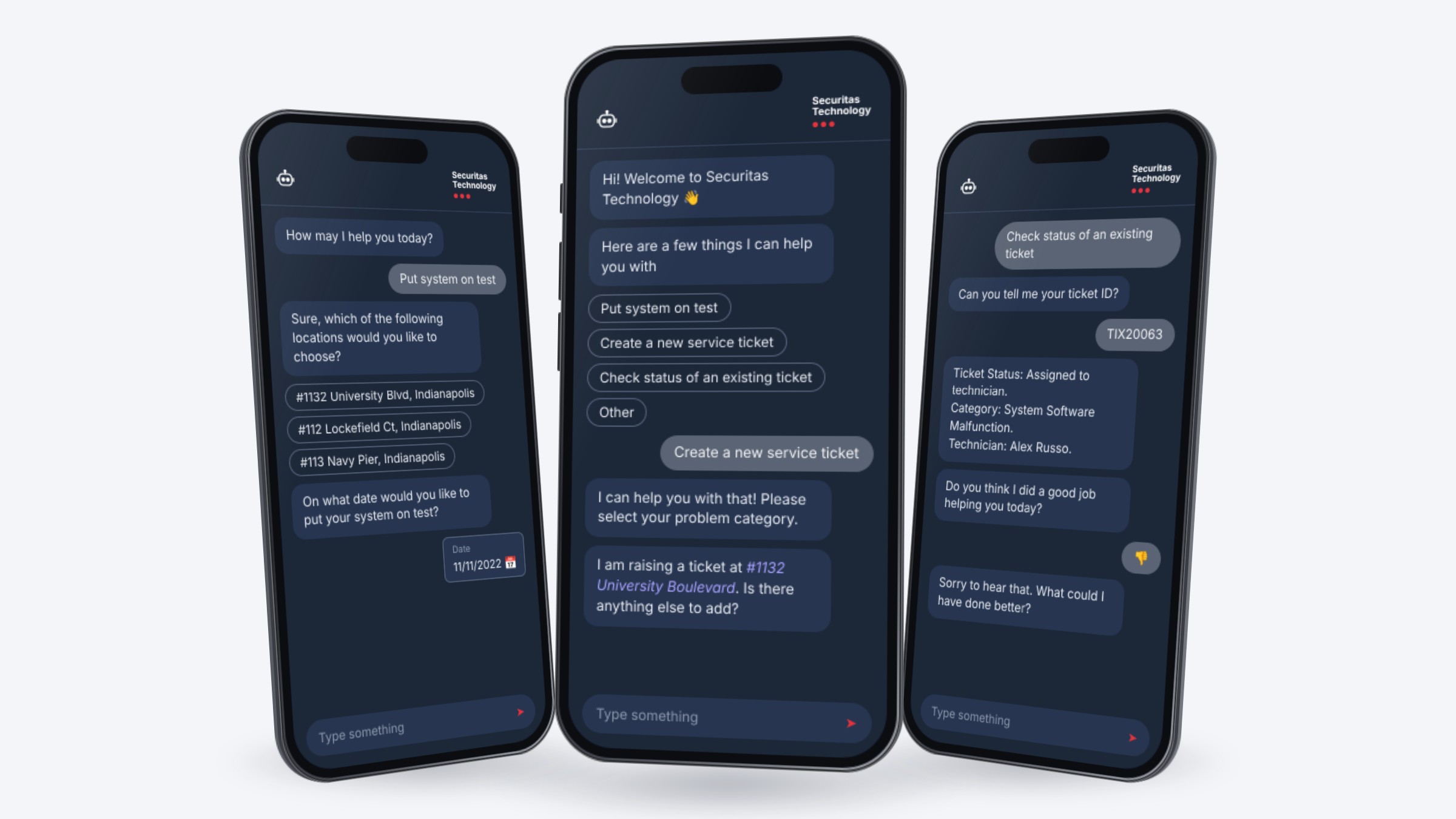
The final experience, refined after testing and built in Figma, with each screen showing one design decision.
Hi! Welcome to Securitas Technology 👋
Here are few things I can help you with
Descriptive / Predefined Input Method
Hi! Welcome to Securitas 👋
How may I help you today?
Put system on test
Sure, which of the following locations would you like to choose?
Auto Suggest Location from HQ Account
Put system on test
Sure, which of the following locations would you like to choose?
#1132 University Boulevard, Indianapolis
On what date would you like to put your system on test at #1132 University Boulevard, Indianapolis?
At what time do you want to start this test on the 11th of November?
• • •
In App Widgets for Date and Time
Putting #1132 University Boulevard, Indianapolis on test mode from 2PM to 5PM on 11th November 2022.
Confirm
Test Mode will be activated as per your request. I will be sending you an email confirmation shortly.
Is there anything else I can help you with?
No
Do you think I did a good job helping you today?
👎
Sorry to hear that. What could I have done better?
Taking Negative Responses into Account
How may I help you today?
I can help you with that! Please select your problem category.
System software malfunction
Got it! What information would you like to provide to the service technician regarding your issue?
My alarm keeps alerting for fire at all times.
I have made a note of that. Is there any other detail you need to add?
Empathetic & Appropriate Affirmations to Enable Trust
My alarm keeps alerting for fire at all times.
Sorry to hear that. Is there any other detail you need to add?
No
Alright, which of your locations is facing this issue?
#1132 University Boulevard, Indianapolis
You and the on-site contact for this location, Jay Stuart, will be contacted for updates related to this ticket.
Is there anyone else you would like to add for this ticket?
Smart Bot Responses based on Existing Knowledge
Hi! Welcome to Securitas 👋
How may I help you today?
Check status of an existing ticket
Can you tell me your ticket ID?
You may find it in the confirmation email you received after raising the ticket.
TIX20063
Ticket Status: Assigned to technician.
Ticket Category: System Software Malfunction.
Technician Name: Alex Russo.
Date of Ticket Creation: 11/27/22.
You will be contacted by the assigned technician for further assistance.
If you need urgent help with this ticket, please call us at 1800-xxx-xxx.
Detailed Information in Response to User Queries
Alright, which of your locations is facing this issue?
#1132 University Boulevard, Indianapolis
You and the on-site contact for this location, Jay Stuart, will be contacted for updates related to this ticket.
Is there anyone else you would like to add for this ticket?
No
I am raising a ticket at #1132 University Boulevard, Indianapolis for a System Software Malfunction. Is there any additional information you need to provide?
Confirmation Prior to Finalizing Bot Action
Outcome
Impact
Our research and recommendations shaped the next update of Securitas’s support chatbot
Recognition
Won the Best Research and Design Project Award
What we handed over
Why customers call
The top call reasons, from CallRail data and recorded calls
Interview insights
Findings from 6 customer and 2 stakeholder interviews
Tested conversation flows
Validated flows for test mode and service dispatch
Client feedback
“
The research was good validation for what we had already collected. This work and the data are a great foundation to base our future conversational projects on. Great job!
Connor Nash
Stakeholder and Design Manager, Securitas Technology
“
Working with your team through this project has been a wonderful experience. You really came through with the final deliverables, and I’m proud of your work.
Olivier Willems
Project Manager